

正文
maven中央仓库访问速度太慢的解决办法

 提示:扫一扫查出行
【扫一扫了解最新限行尾号】
复制提示
方法一:修改settings.xml
eclipse中集成的maven的settings.xml文件,找了半年也没找到,我们放弃eclipse中的maven,下一个最新的maven,并在eclipse中配置该maven中的settings.xml:
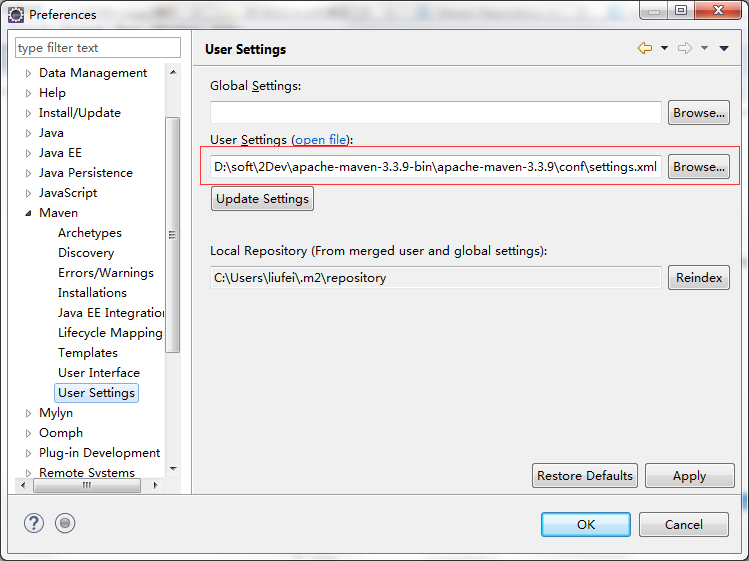
eclipse在第一次编译maven项目时,会下载很多maven的插件,如果什么都没做的话,就会从默认的官网仓库地址下载。
为了加快访问速度,我们要把官网仓库地址替换为国内访问速度较快的镜像地址。
这里用的是:http://maven.aliyun.com/nexus/content/groups/public/ 这个地址,
在settings.xml中找到

然后在注释外边,mirrors标签里面配一个mirror:
<mirror>
<id>mirrorId</id>
<mirrorOf>central</mirrorOf>
<name>Human Readable Name for this Mirror.</name>
<url>http://maven.aliyun.com/nexus/content/groups/public/</url>
</mirror>
如此中央仓库(central)的默认地址就被aliyun的地址拦截了。
方法二:直接在pom.xml上改
<repositories>
<repository>
<id>aliyun</id>
<name>aliyun</name>
<url>http://maven.aliyun.com/nexus/content/groups/public/</url>
<layout>default</layout>
<releases>
<enabled>true</enabled>
<updatePolicy>never</updatePolicy>
</releases>
<snapshots>
<enabled>true</enabled>
<updatePolicy>never</updatePolicy>
</snapshots>
</repository>
</repositories>
<pluginRepositories>
<pluginRepository>
<id>aliyun</id>
<name>aliyun</name>
<url>http://maven.aliyun.com/nexus/content/groups/public/</url>
<releases>
<enabled>true</enabled>
</releases>
<snapshots>
<enabled>false</enabled>
</snapshots>
</pluginRepository>
</pluginRepositories>
加上这两段即可。
关于repository和mirror的关系,maven会先从repository读仓库信息,然后去settings.xml中找一下mirror里面有没有同名的,如果有就用同名mirror的地址,没有则使用repository中的地址。


