正文
开源框架YiShaAdmin如何使用任务计划

 提示:扫一扫查出行
【扫一扫了解最新限行尾号】
复制提示
1.在Startup添加 new JobCenter().Start();(红色字体,下同)
// This method gets called by the runtime. Use this method to configure the HTTP request pipeline.
public void Configure(IApplicationBuilder app, IWebHostEnvironment env)
{
if (!string.IsNullOrEmpty(GlobalContext.SystemConfig.VirtualDirectory))
{
app.UsePathBase(new PathString(GlobalContext.SystemConfig.VirtualDirectory)); // 让 Pathbase 中间件成为第一个处理请求的中间件, 才能正确的模拟虚拟路径
}
if (WebHostEnvironment.IsDevelopment())
{
GlobalContext.SystemConfig.Debug = true;
app.UseDeveloperExceptionPage();
}
else
{
app.UseExceptionHandler("/Home/Error");
} string resource = Path.Combine(env.ContentRootPath, "Resource");
FileHelper.CreateDirectory(resource); app.UseStaticFiles(new StaticFileOptions
{
OnPrepareResponse = GlobalContext.SetCacheControl
});
app.UseStaticFiles(new StaticFileOptions
{
RequestPath = "/Resource",
FileProvider = new PhysicalFileProvider(resource),
OnPrepareResponse = GlobalContext.SetCacheControl
});
app.UseSession();
app.UseRouting();
app.UseEndpoints(endpoints =>
{
endpoints.MapControllerRoute("areas", "{area:exists}/{controller=Home}/{action=Index}/{id?}");
endpoints.MapControllerRoute("default", "{controller=Home}/{action=Index}/{id?}");
});
GlobalContext.ServiceProvider = app.ApplicationServices;
new JobCenter().Start(); }
2.在YiSha.Business.AutoJob的Job文件夹新建TestConsoleJob.cs
using System.Threading.Tasks;
using YiSha.Util.Model;namespace YiSha.Business.AutoJob
{
internal class TestConsoleJob : IJobTask
{
public async Task<TData> Start()
{
TData obj = new TData();
obj.Tag = 1;
obj.Message = "测试调用成功";
return obj;
}
}
}
3.在JobExecute中加入新添加的任务
using System;
using System.Collections.Generic;
using System.Text;
using System.Threading.Tasks;
using Quartz;
using Quartz.Impl.Triggers;
using YiSha.Entity.SystemManage;
using YiSha.Enum;
using YiSha.Service.SystemManage;
using YiSha.Util;
using YiSha.Util.Extension;
using YiSha.Util.Model;namespace YiSha.Business.AutoJob
{
public class JobExecute : IJob
{
private AutoJobService autoJobService = new AutoJobService();
private AutoJobLogService autoJobLogService = new AutoJobLogService(); public Task Execute(IJobExecutionContext context)
{
return Task.Run(async () =>
{
TData obj = new TData();
long jobId = 0;
JobDataMap jobData = null;
AutoJobEntity dbJobEntity = null;
try
{
jobData = context.JobDetail.JobDataMap;
jobId = jobData["Id"].ParseToLong();
// 获取数据库中的任务
dbJobEntity = await autoJobService.GetEntity(jobId);
if (dbJobEntity != null)
{
if (dbJobEntity.JobStatus == StatusEnum.Yes.ParseToInt())
{
CronTriggerImpl trigger = context.Trigger as CronTriggerImpl;
if (trigger != null)
{
if (trigger.CronExpressionString != dbJobEntity.CronExpression)
{
// 更新任务周期
trigger.CronExpressionString = dbJobEntity.CronExpression;
await JobScheduler.GetScheduler().RescheduleJob(trigger.Key, trigger);
} #region 执行任务
switch (context.JobDetail.Key.Name)
{
case "数据库备份":
obj = await new DatabasesBackupJob().Start();
break;
case "测试任务计划":
obj = await new TestConsoleJob().Start();
break;
}
#endregion
}
}
}
}
catch (Exception ex)
{
obj.Message = ex.GetOriginalException().Message;
LogHelper.Error(ex);
} try
{
if (dbJobEntity != null)
{
if (dbJobEntity.JobStatus == StatusEnum.Yes.ParseToInt())
{
#region 更新下次运行时间
await autoJobService.SaveForm(new AutoJobEntity
{
Id = dbJobEntity.Id,
NextStartTime = context.NextFireTimeUtc.Value.DateTime.AddHours(8)
});
#endregion #region 记录执行状态
await autoJobLogService.SaveForm(new AutoJobLogEntity
{
JobGroupName = context.JobDetail.Key.Group,
JobName = context.JobDetail.Key.Name,
LogStatus = obj.Tag,
Remark = obj.Message
});
#endregion
}
}
}
catch (Exception ex)
{
obj.Message = ex.GetOriginalException().Message;
LogHelper.Error(ex);
}
});
}
}
}
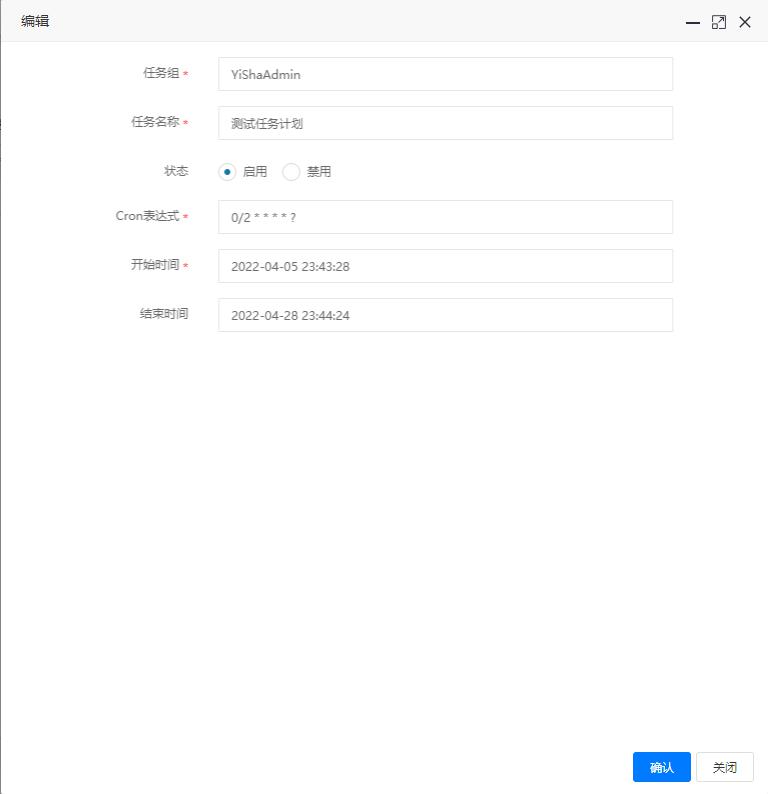
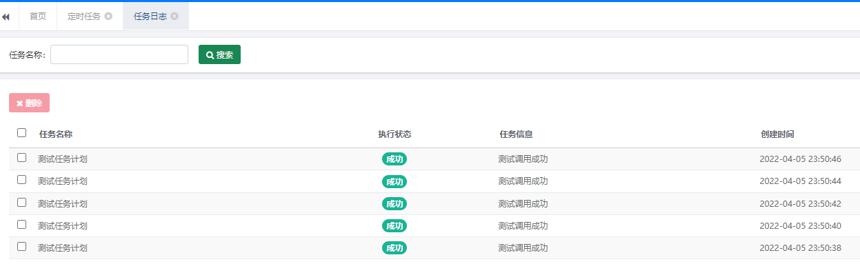
4.添加任务计划,测试