正文
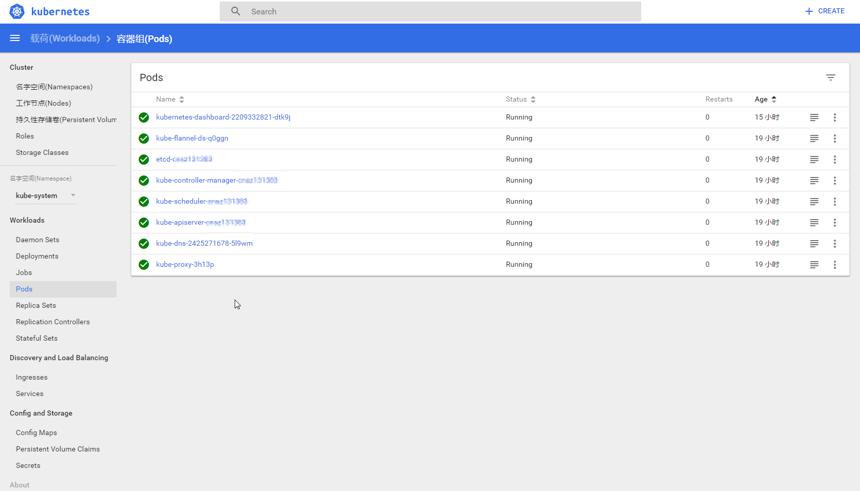
在k8s 1.7.0上启用dashboard的注意事项

 提示:扫一扫查出行
【扫一扫了解最新限行尾号】
复制提示
因为自k8s 1.6之后,有基于角色的安全性。
所以很多网上以前的教程就不能使用了。
结合以下三个文档,暂时实现了dashboard界面的推出。
http://blog.csdn.net/jinzili777/article/details/73550687
http://m.dockerinfo.net/4468.html
https://rawgit.com/kubernetes/dashboard/master/src/deploy/kubernetes-dashboard.yaml
=============
kubernetes-dashboard-rbac.yaml
kind: ClusterRoleBinding
apiVersion: rbac.authorization.k8s.io/v1beta1
metadata:
  name: dashboard-admin
roleRef:
  apiGroup: rbac.authorization.k8s.io
  kind: ClusterRole
  name: cluster-admin
subjects:
- kind: ServiceAccount
  name: default
  namespace: kube-system
kubernetes-dashboard.yaml
# Copyright 2015 Google Inc. All Rights Reserved.
#
# Licensed under the Apache License, Version 2.0 (the "License");
# you may not use this file except in compliance with the License.
# You may obtain a copy of the License at
#
#     http://www.apache.org/licenses/LICENSE-2.0
#
# Unless required by applicable law or agreed to in writing, software
# distributed under the License is distributed on an "AS IS" BASIS,
# WITHOUT WARRANTIES OR CONDITIONS OF ANY KIND, either express or implied.
# See the License for the specific language governing permissions and
# limitations under the License.

# Configuration to deploy release version of the Dashboard UI compatible with
# Kubernetes 1.6 (RBAC enabled).
#
# Example usage: kubectl create -f <this_file>

apiVersion: v1
kind: ServiceAccount
metadata:
  labels:
    k8s-app: kubernetes-dashboard
  name: kubernetes-dashboard
  namespace: kube-system
---
apiVersion: rbac.authorization.k8s.io/v1beta1
kind: ClusterRoleBinding
metadata:
  name: kubernetes-dashboard
  labels:
    k8s-app: kubernetes-dashboard
roleRef:
  apiGroup: rbac.authorization.k8s.io
  kind: ClusterRole
  name: cluster-admin
subjects:
- kind: ServiceAccount
  name: kubernetes-dashboard
  namespace: kube-system
---
kind: Deployment
apiVersion: extensions/v1beta1
metadata:
  labels:
    k8s-app: kubernetes-dashboard
  name: kubernetes-dashboard
  namespace: kube-system
spec:
  replicas: 1
  revisionHistoryLimit: 10
  selector:
    matchLabels:
      k8s-app: kubernetes-dashboard
  template:
    metadata:
      labels:
        k8s-app: kubernetes-dashboard
    spec:
      containers:
      - name: kubernetes-dashboard
        image: gcr.io/google_containers/kubernetes-dashboard-amd64:v1.6.1
        ports:
        - containerPort: 9090
          protocol: TCP
        args:
          # Uncomment the following line to manually specify Kubernetes API server Host
          # If not specified, Dashboard will attempt to auto discover the API server and connect
          # to it. Uncomment only if the default does not work.
          # - --apiserver-host=http://my-address:port
        livenessProbe:
          httpGet:
            path: /
            port: 9090
          initialDelaySeconds: 30
          timeoutSeconds: 30
      serviceAccountName: kubernetes-dashboard
      # Comment the following tolerations if Dashboard must not be deployed on master
      tolerations:
      - key: node-role.kubernetes.io/master
        effect: NoSchedule
---
kind: Service
apiVersion: v1
metadata:
  labels:
    k8s-app: kubernetes-dashboard
  name: kubernetes-dashboard
  namespace: kube-system
spec:
  type: NodePort
  ports:
  - port: 80
    targetPort: 9090
  selector:
    k8s-app: kubernetes-dashboard
在获得了相关的IP和端口之后,通过kubectl proxy命令打开端口。
kubectl proxy --address='12.3.1' --port=8086 --accept-hosts='^*$'