

正文
NAT及静态转换,动态转换及PAT

 提示:扫一扫查出行
【扫一扫了解最新限行尾号】
复制提示
NAT及静态转换,动态转换及PAT
-
案例1:配置静态NAT
-
案例2:配置端口映射
-
案例3:配置动态NAT
-
案例4:PAT配置
-
案例5:办公区Internet的访问
1 案例1:配置静态NAT
1.1 问题
1.1 问题
随着接入Internet的计算机数量的不断猛增,IP地址资源也就愈加显得捉襟见肘。事实上,除了中国教育和科研计算机网(CERNET)外,一般用户几乎申请不到整段的C类IP地址。在其他ISP那里,即使是拥有几百台计算机的大型局域网用户,当他们申请IP地址时,所分配的地址也不过只有几个或十几个IP地址。显然,这样少的IP地址根本无法满足网络用户的需求。
- 在R1上配置静态NAT使192.168.1.1转换为61.159.62.131,192.168.1.2转换为61.159.62.132,实现外部网络访问。
1.2 方案
借助于NAT,私有(保留)地址的"内部"网络通过路由器发送数据包时,私有地址被转换成合法的IP地址,一个局域网只需使用少量IP地址(甚至是1个)即可实现私有地址网络内所有计算机与Internet的通信需求。
这种通过使用少量的公有IP 地址代表较多的私有IP 地址的方式,将有助于减缓可用IP地址空间的枯竭。而且还能够有效地避免来自网络外部的攻击,隐藏并保护网络内部的计算机。
网络拓扑如图-1所示:
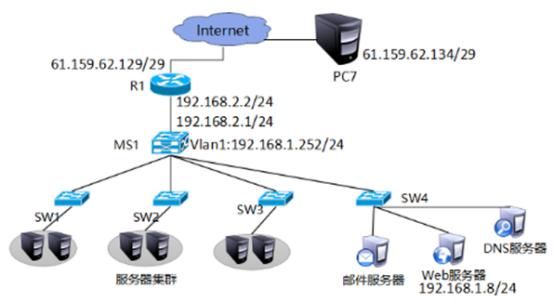
图-1
1.3 步骤
实现此案例需要按照如下步骤进行。
步骤一:通用配置
1)配置R1端口IP地址,以及默认路由
- tarena - R1 ( config ) # interface f0 / 0
- tarena - R1 ( config - if ) #ip address 192.168.1.254 255.255.255.0
- tarena - R1 ( config - if ) #no shutdown
- tarena - R1 ( config - if ) # interface f0 / 1
- tarena - R1 ( config - if ) #ip address 61.159.62.129 255.255.255.248
- tarena - R1 ( config - if ) #no shutdown
- tarena - R1 ( config - if ) #exit
- tarena - R1 ( config ) #ip route 0.0.0.0 0.0.0.0 f0 / 1
2)配置R2端口IP地址
不需要在R2上配置到企业内网的静态路由,因为NAT的存在,企业内部的地址都将被转换、隐藏。
- tarena - R2 ( config ) # interface f0 / 0
- tarena - R2 ( config - if ) #ip address 61.159.62.130 255.255.255.248
- tarena - R2 ( config - if ) #no shutdown
- tarena - R2 ( config - if ) # interface f0 / 1
- tarena - R2 ( config - if ) #ip address 192.168.2.254 255.255.255.0
- tarena - R2 ( config - if ) #no shutdown
步骤二:静态NAT配置
1)在R1上将192.168.1.1映射到61.159.62.131,将192.168.1.2映射到61.159.62.132
静态映射有唯一对应的关系。
通过静态NAT,可以把内网服务器发布到外网。
- tarena - R1 ( config ) #ip nat inside source static 192.168.1.1 61.159.62.131
- tarena - R1 ( config ) #ip nat inside source static 192.168.1.2 61.159.62.132
2)在R1上配置NAT内、外端口
- tarena - R1 ( config ) # interface f0 / 0
- tarena - R1 ( config - if ) #ip nat inside
- tarena - R1 ( config - if ) # interface f0 / 1
- tarena - R1 ( config - if ) #ip nat outside
3)分别在两台PC机上测试到外网主机的通信
PC1测试如下所示:
- PC > ipconfig
- FastEthernet0 Connection :( default port )
- Link - local IPv6 Address .........: FE80 :: 2D0 : FFFF : FE45 : CACC
- IP Address ......................: 192.168.1.1
- Subnet Mask .....................: 255.255.255.0
- Default Gateway .................: 192.168.1.254
- PC > ping 192.168.2.1
- Pinging 192.168.2.1 with 32 bytes of data :
- Reply from 192.168.2.1 : bytes = 32 time = 1ms TTL = 126
- Reply from 192.168.2.1 : bytes = 32 time = 0ms TTL = 126
- Reply from 192.168.2.1 : bytes = 32 time = 0ms TTL = 126
- Reply from 192.168.2.1 : bytes = 32 time = 0ms TTL = 126
- Ping statistics for 192.168.2.1 :
- Packets : Sent = 4 , Received = 4 , Lost = 0 ( 0 % loss ),
- Approximate round trip times in milli - seconds :
- Minimum = 0ms , Maximum = 1ms , Average = 0ms
- PC >
PC2的测试如下所示:
- PC > ipconfig
- FastEthernet0 Connection :( default port )
- Link - local IPv6 Address .........: FE80 :: 200 : CFF : FEEA : DE30
- IP Address ......................: 192.168.1.2
- Subnet Mask .....................: 255.255.255.0
- Default Gateway .................: 192.168.1.254
- PC > ping 192.168.2.1
- Pinging 192.168.2.1 with 32 bytes of data :
- Request timed out .
- Reply from 192.168.2.1 : bytes = 32 time = 0ms TTL = 126
- Reply from 192.168.2.1 : bytes = 32 time = 0ms TTL = 126
- Reply from 192.168.2.1 : bytes = 32 time = 0ms TTL = 126
- Ping statistics for 192.168.2.1 :
- Packets : Sent = 4 , Received = 3 , Lost = 1 ( 25 % loss ),
- Approximate round trip times in milli - seconds :
- Minimum = 0ms , Maximum = 0ms , Average = 0ms
- PC >
4)在R1上查看NAT转换表
- tarena - R1#show ip nat translations
- Pro Inside global Inside local Outside local Outside global
- icmp 61.159.62.131 : 10 192.168.1.1 : 10 192.168.2.1 : 10 192.168.2.1 : 10
- icmp 61.159.62.131 : 11 192.168.1.1 : 11 192.168.2.1 : 11 192.168.2.1 : 11
- icmp 61.159.62.131 : 12 192.168.1.1 : 12 192.168.2.1 : 12 192.168.2.1 : 12
- icmp 61.159.62.131 : 9 192.168.1.1 : 9 192.168.2.1 : 9 192.168.2.1 : 9
- icmp 61.159.62.132 : 27 192.168.1.2 : 27 192.168.2.1 : 27 192.168.2.1 : 27
- icmp 61.159.62.132 : 28 192.168.1.2 : 28 192.168.2.1 : 28 192.168.2.1 : 28
- icmp 61.159.62.132 : 29 192.168.1.2 : 29 192.168.2.1 : 29 192.168.2.1 : 29
- icmp 61.159.62.132 : 30 192.168.1.2 : 30 192.168.2.1 : 30 192.168.2.1 : 30
2 案例2:配置端口映射
2.1 问题
通过端口映射技术将内部服务器发布向Internet。
2.2 方案
在R1上配置端口映射将192.168.1.3的80端口映射为61.159.62.133的80端口,将web服务器发布到Internet。网络拓扑如图-2所
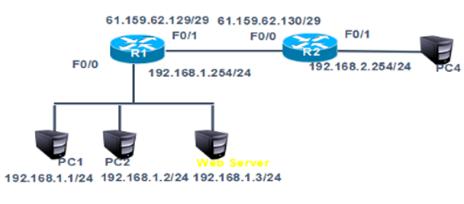
图-2
2.3 步骤
实现此案例需要按照如下步骤进行。
步骤一:通用配置
1)在案例一基础上取消静态转换条目,在192.168.1.0网络新增一台web服务器IP为192.168.1.3。将192.168.1.3的80端口映射为61.159.62.133的80端口
- tarena - R1 ( config ) #no ip nat inside source static 192.168.1.1 61.159.62.131
- tarena - R1 ( config ) #no ip nat inside source static 192.168.1.2 61.159.62.132
- tarena - R1 ( config ) #ip nat inside source static tcp 192.168.1.3 80 61.159.62.133 80
步骤二:PC3上访问web服务器进行验证
1)外部主机PC4上访问61.159.62.133进行验证,如图-3所示
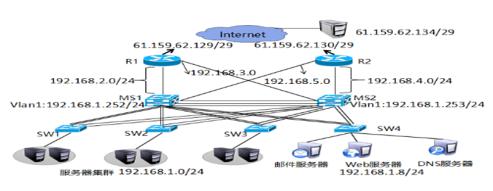
图-3
3 案例3:配置动态NAT
3.1 问题
-
在R1通过动态NAT实现企业内网192.168.1.0/24转换为公网地址61.159.62.131-61.159.62.134,访问192.168.2.1
3.2 方案
网络拓扑如图-4所示:
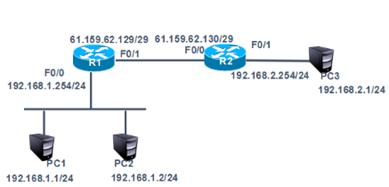
图-4
3.3 步骤
实现此案例需要按照如下步骤进行。
步骤一:动态NAT配置
1)删除案例2中的端口映射
- tarena - R1 ( config ) #no ip nat inside source static tcp 192.168.1.3 80 61.159.62.133 80
2)在R1上配置ACL
- tarena - R1 ( config ) #access - list 1 permit 192.168.1.0 0.0.0.255
3)在R1上配置可转换的公网IP地址池
地址池是向ISP(Internet服务提供商,如电信、联通)申请得到的,内网主机(上一步ACL中所包含的IP地址)到外网的访问,内网地址将被动态的、随机的转换为这些合法地址。
- tarena - R1 ( config ) #ip nat pool natpool 61.159.62.131 61.159.62.134 netmask 255.255.255.248
4)关联ACL和公网的IP地址池
- tarena - R1 ( config ) #ip nat inside source list 1 pool natpool
5)在R1上配置NAT内、外端口
- tarena - R1 ( config ) # interface f0 / 0
- tarena - R1 ( config - if ) #ip nat inside
- tarena - R1 ( config - if ) # interface f0 / 1
- tarena - R1 ( config - if ) #ip nat outside
6)分别在两台PC机上测试到外网主机的通信
PC1测试如下所示:
- PC > ipconfig
- FastEthernet0 Connection :( default port )
- Link - local IPv6 Address .........: FE80 :: 2D0 : FFFF : FE45 : CACC
- IP Address ......................: 192.168.1.1
- Subnet Mask .....................: 255.255.255.0
- Default Gateway .................: 192.168.1.254
- PC > ping 192.168.2.1
- Pinging 192.168.2.1 with 32 bytes of data :
- Reply from 192.168.2.1 : bytes = 32 time = 1ms TTL = 126
- Reply from 192.168.2.1 : bytes = 32 time = 0ms TTL = 126
- Reply from 192.168.2.1 : bytes = 32 time = 0ms TTL = 126
- Reply from 192.168.2.1 : bytes = 32 time = 0ms TTL = 126
- Ping statistics for 192.168.2.1 :
- Packets : Sent = 4 , Received = 4 , Lost = 0 ( 0 % loss ),
- Approximate round trip times in milli - seconds :
- Minimum = 0ms , Maximum = 1ms , Average = 0ms
- PC >
PC2测试如下所示:
- PC > ipconfig
- FastEthernet0 Connection :( default port )
- Link - local IPv6 Address .........: FE80 :: 2D0 : FFFF : FE45 : CACC
- IP Address ......................: 192.168.1.2
- Subnet Mask .....................: 255.255.255.0
- Default Gateway .................: 192.168.1.254
- PC > ping 192.168.2.1
- Pinging 192.168.2.1 with 32 bytes of data :
- Reply from 192.168.2.1 : bytes = 32 time = 1ms TTL = 126
- Reply from 192.168.2.1 : bytes = 32 time = 0ms TTL = 126
- Reply from 192.168.2.1 : bytes = 32 time = 0ms TTL = 126
- Reply from 192.168.2.1 : bytes = 32 time = 0ms TTL = 126
- Ping statistics for 192.168.2.1 :
- Packets : Sent = 4 , Received = 4 , Lost = 0 ( 0 % loss ),
- Approximate round trip times in milli - seconds :
- Minimum = 0ms , Maximum = 1ms , Average = 0ms
7)在R1上查看NAT转换表
转换表中的对应关系是动态的,如192.168.1.1被转换为61.159.62.131,但是下一次对外网的访问很有可能被转换为其他地址。
- tarena - R1#show ip nat translations
- Pro Inside global Inside local Outside local Outside global
- icmp 61.159.62.131 : 1362192.168.1.1 : 1362 192.168.2.1 : 1362 192.168.2.1 : 1362
- icmp 61.159.62.131 : 1392192.168.1.1 : 1392 192.168.2.1 : 1392 192.168.2.1 : 1392
- icmp 61.159.62.131 : 1393192.168.1.1 : 1393 192.168.2.1 : 1393 192.168.2.1 : 1393
- icmp 61.159.62.131 : 1394192.168.1.1 : 1394 192.168.2.1 : 1394 192.168.2.1 : 1394
- icmp 61.159.62.132 : 13 192.168.1.2 : 13 192.168.2.1 : 13 192.168.2.1 : 13
- icmp 61.159.62.132 : 14 192.168.1.2 : 14 192.168.2.1 : 14 192.168.2.1 : 14
- icmp 61.159.62.132 : 15 192.168.1.2 : 15 192.168.2.1 : 15 192.168.2.1 : 15
- icmp 61.159.62.132 : 16 192.168.1.2 : 16 192.168.2.1 : 16 192.168.2.1 : 16
4 案例4:PAT配置
4.1 问题
在R1配置PAT端口多路复用使企业内网192.168.1.0/24复用f0/1端口的IP,实现外部网络的访问。
4.2 方案
网络拓扑如图-5所示:
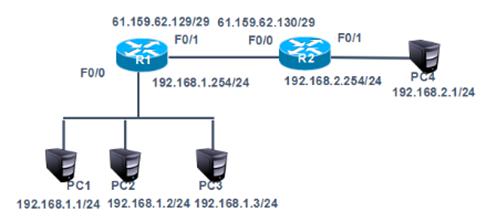
图-5
4.3 步骤
实现此案例需要按照如下步骤进行。
步骤一:基于端口的PAT配置限制
1)删除案例3中动态NAT配置
- tarena - R1 ( config ) #no ip nat inside source list 1
- tarena - R1 ( config ) #no ip nat pool natpool
- tarena - R1 ( config ) #no access - list 1
2)在R1上配置ACL
- tarena - R1 ( config ) #access - list 1 permit 192.168.1.0 0.0.0.255
3)关联ACL和路由器连接互联网的端口
该命令最后加上的overload表示复用。
- tarena - R1 ( config ) #ip nat inside source list 1 interface f0 / 1 overload
4)在R1上配置NAT内、外端口
- tarena - R1 ( config ) # interface f0 / 0
- tarena - R1 ( config - if ) #ip nat inside
- tarena - R1 ( config - if ) # interface f0 / 1
- tarena - R1 ( config - if ) #ip nat outside
5)分别在两台PC机上测试到外网主机的通信
PC1测试如下所示:
- PC > ipconfig
- FastEthernet0 Connection :( default port )
- Link - local IPv6 Address .........: FE80 :: 2D0 : FFFF : FE45 : CACC
- IP Address ......................: 192.168.1.1
- Subnet Mask .....................: 255.255.255.0
- Default Gateway .................: 192.168.1.254
- PC > ping 192.168.2.1
- Pinging 192.168.2.1 with 32 bytes of data :
- Reply from 192.168.2.1 : bytes = 32 time = 1ms TTL = 126
- Reply from 192.168.2.1 : bytes = 32 time = 0ms TTL = 126
- Reply from 192.168.2.1 : bytes = 32 time = 0ms TTL = 126
- Reply from 192.168.2.1 : bytes = 32 time = 0ms TTL = 126
- Ping statistics for 192.168.2.1 :
- Packets : Sent = 4 , Received = 4 , Lost = 0 ( 0 % loss ),
- Approximate round trip times in milli - seconds :
- Minimum = 0ms , Maximum = 1ms , Average = 0ms
- PC >
PC2测试如下所示:
- PC > ipconfig
- FastEthernet0 Connection :( default port )
- Link - local IPv6 Address .........: FE80 :: 2D0 : FFFF : FE45 : CACC
- IP Address ......................: 192.168.1.2
- Subnet Mask .....................: 255.255.255.0
- Default Gateway .................: 192.168.1.254
- PC > ping 192.168.2.1
- Pinging 192.168.2.1 with 32 bytes of data :
- Reply from 192.168.2.1 : bytes = 32 time = 1ms TTL = 126
- Reply from 192.168.2.1 : bytes = 32 time = 0ms TTL = 126
- Reply from 192.168.2.1 : bytes = 32 time = 0ms TTL = 126
- Reply from 192.168.2.1 : bytes = 32 time = 0ms TTL = 126
- Ping statistics for 192.168.2.1 :
- Packets : Sent = 4 , Received = 4 , Lost = 0 ( 0 % loss ),
- Approximate round trip times in milli - seconds :
- Minimum = 0ms , Maximum = 1ms , Average = 0ms
- PC >
6)在R1上查看NAT转换表
- tarena - R1#show ip nat translations
- Pro Inside global Inside local Outside local Outside global
- icmp 61.159.62.129 : 2029192.168.1.1 : 2029 192.168.2.1 : 2029 192.168.2.1 : 2029
- icmp 61.159.62.129 : 2030192.168.1.1 : 2030 192.168.2.1 : 2030 192.168.2.1 : 2030
- icmp 61.159.62.129 : 2031192.168.1.1 : 2031 192.168.2.1 : 2031 192.168.2.1 : 2031
- icmp 61.159.62.129 : 2032192.168.1.1 : 2032 192.168.2.1 : 2032 192.168.2.1 : 2032
- icmp 61.159.62.129 : 2033192.168.1.1 : 2033 192.168.2.1 : 2033 192.168.2.1 : 2033
- icmp 61.159.62.129 : 2034192.168.1.1 : 2034 192.168.2.1 : 2034 192.168.2.1 : 2034
- icmp 61.159.62.129 : 2035192.168.1.1 : 2035 192.168.2.1 : 2035 192.168.2.1 : 2035
输出结果显示,所有的内网IP地址在访问外网前均被转换成了路由器端口的IP地址。
5 案例5:办公区Internet的访问
5.1 问题
在R1配置PAT端口多路复用使企业内网192.168.1.0/24复用f0/1端口的IP,实现外部网络的访问。
5.2 方案
网络拓扑如图-6所示:
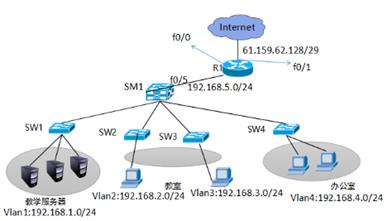
图-6
5.3 步骤
实现此案例需要按照如下步骤进行。
步骤一:在SM1划分vlan2、vlan3、vlan4 并给SM1配置虚端口IP并开启路由功能,1-4接口开启trunk
1)创建vlan并设置管理IP,开启路由功能,并把相应的接口划分到vlan下
- SM1 ( config ) ip routing
- SM1 ( config ) #vlan 2
- SM1 ( config - vlan ) #vlan 3
- SM1 ( config - vlan ) #vlan 4
- SM1 ( config - vlan ) #
- SM1 ( config - vlan ) #exit
- SM1 ( config ) # interface vlan 1
- SM1 ( config - if ) #ip address 192.168.1.254 255.255.255.0
- SM1 ( config - if ) #eixt
- SM1 ( config - if ) #no shutdown
- SM1 ( config - if ) #exit
- SM1 ( config ) # interface vlan 2
- SM1 ( config - if ) #ip address 192.168.2.254 255.255.255.0
- SM1 ( config - if ) #no shutdown
- SM1 ( config - if ) #exit
- SM1 ( config ) # interface vlan 3
- SM1 ( config - if ) #ip address 192.168.3.254 255.255.255.0
- SM1 ( config - if ) #no shutdown
- SM1 ( config - if ) #exit
- SM1 ( config ) # interface vlan 4
- SM1 ( config - if ) #ip address 192.168.4.254 255.255.255.0
- SM1 ( config - if ) #no shutdown
- sw2 ( config ) #vlan 2
- sw2 ( config - vlan ) #exit
- sw2 ( config ) # interface fastEthernet 0 / 1
- sw2 ( config - if ) #switchport access vlan 2
- sw3 ( config ) #vlan 3
- sw3 ( config - vlan ) #exit
- sw3 ( config ) # interface fastEthernet 0 / 1
- sw3 ( config - if ) #switchport access vlan 3
- sw4 ( config ) #vlan 4
- sw4 ( config - vlan ) #exit
- sw4 ( config ) # interface fastEthernet 0 / 1
- sw4 ( config - if ) #switchport access vlan 4
2)交换机之间所连接的接口开启trunk
- SM1 ( config ) # interface range f0 / 1 - 4
- SM1 ( config - if - range ) #switchport trunk encapsulation dot1q
- SM1 ( config - if - range ) #switchport mode trunk
- sw1 ( config ) # interface fastEthernet 0 / 3
- sw1 ( config - if ) #switchport mode trunk
- sw2 ( config ) # interface fastEthernet 0 / 3
- sw2 ( config - if ) #switchport mode trunk
- sw3 ( config ) # interface fastEthernet 0 / 3
- sw3 ( config - if ) #switchport mode trunk
- sw4 ( config ) # interface fastEthernet 0 / 3
- sw4 ( config - if ) #switchport mode trunk
3)测试vlan之间的连通性
- PC > ipconfig
- FastEthernet0 Connection :( default port )
- Link - local IPv6 Address .........: FE80 :: 290 : 21FF : FEC2 : 1A50
- IP Address ......................: 192.168.1.1
- Subnet Mask .....................: 255.255.255.0
- Default Gateway .................: 192.168.1.254
- PC > ping 192.168.2.1
- Pinging 192.168.2.1 with 32 bytes of data :
- Reply from 192.168.2.1 : bytes = 32 time = 0ms TTL = 127
- Reply from 192.168.2.1 : bytes = 32 time = 0ms TTL = 127
- Reply from 192.168.2.1 : bytes = 32 time = 0ms TTL = 127
- Reply from 192.168.2.1 : bytes = 32 time = 1ms TTL = 12
- Ping statistics for 192.168.2.1 :
- Packets : Sent = 4 , Received = 3 , Lost = 1 ( 25 % loss ),
- Approximate round trip times in milli - seconds :
- Minimum = 0ms , Maximum = 1ms , Average = 0ms
- PC > ping 192.168.3.1
- Pinging 192.168.3.1 with 32 bytes of data :
- Reply from 192.168.2.1 : bytes = 32 time = 0ms TTL = 127
- Reply from 192.168.3.1 : bytes = 32 time = 0ms TTL = 127
- Reply from 192.168.3.1 : bytes = 32 time = 0ms TTL = 127
- Reply from 192.168.3.1 : bytes = 32 time = 1ms TTL = 127
- Ping statistics for 192.168.3.1 :
- Packets : Sent = 4 , Received = 3 , Lost = 1 ( 25 % loss ),
- Approximate round trip times in milli - seconds :
- Minimum = 0ms , Maximum = 1ms , Average = 0ms
- PC > ping 192.168.4.1
- Pinging 192.168.4.1 with 32 bytes of data :
- Reply from 192.168.2.1 : bytes = 32 time = 0ms TTL = 127
- Reply from 192.168.2.1 : bytes = 32 time = 0ms TTL = 127
- Reply from 192.168.2.1 : bytes = 32 time = 0ms TTL = 127
- Reply from 192.168.4.1 : bytes = 32 time = 0ms TTL = 127
- Ping statistics for 192.168.4.1 :
- Packets : Sent = 4 , Received = 1 , Lost = 3 ( 75 % loss ),
- Approximate round trip times in milli - seconds :
- Minimum = 0ms , Maximum = 0ms , Average = 0ms
4)为SM1与路由器连接的接口和路由器配置IP并启用动态路由RIP协议.
- SM1 ( config ) # interface fastEthernet 0 / 5
- SM1 ( config - if ) #no switchport
- SM1 ( config - if ) #ip add 192.168.5.1 255.255.255.0
- SM1 ( config - if ) #no shutdown
- SM1 ( config - if ) #exit
- SM1 ( config ) #router rip
- SM1 ( config - router ) #version 2
- SM1 ( config - router ) #no auto - summary
- SM1 ( config - router ) #network 192.168.1.0
- SM1 ( config - router ) #network 192.168.2.0
- SM1 ( config - router ) #network 192.168.3.0
- SM1 ( config - router ) #network 192.168.4.0
- SM1 ( config - router ) #network 192.168.5.0
- Router ( config ) # interface fastEthernet 0 / 0
- Router ( config - if ) #ip address 192.168.5.2 255.255.255.0
- Router ( config - if ) #no shutdown
- Router ( config - if ) #exit
- Router ( config ) # interface fastEthernet 0 / 1
- Router ( config - if ) #ip address 61.159.62.129 255.255.255.248
- Router ( config - if ) #exit
- Router ( config ) #router rip
- Router ( config - router ) #version 2
- Router ( config - router ) #no auto - summary
- Router ( config - router ) #network 192.168.5.0
5)在路由器上配置默认路由并发布到RIP协议里并在三成交换机SM1上查看路由表
- Router ( config ) #ip route 0.0.0.0 0.0.0.0 f0 / 1
- Router ( config ) #router rip
- Router ( config - router ) # default - information originate
SM路由表如下所示:
- SM1# show ip route
- Codes : C - connected , S - static , I - IGRP , R - RIP , M - mobile , B - BGP
- D - EIGRP , EX - EIGRP external , O - OSPF , IA - OSPF inter area
- N1 - OSPF NSSA external type 1 , N2 - OSPF NSSA external type 2
- E1 - OSPF external type 1 , E2 - OSPF external type 2 , E - EGP
- i - IS - IS , L1 - IS - IS level -1 , L2 - IS - IS level -2 , ia - IS - IS inter area
- * - candidate default , U - per - user static route , o - ODR
- P - periodic downloaded static route
- Gateway of last resort is 192.168.5.2 to network 0.0.0.0
- C 192.168.1.0 / 24 is directly connected , Vlan1
- C 192.168.2.0 / 24 is directly connected , Vlan2
- C 192.168.3.0 / 24 is directly connected , Vlan3
- C 192.168.4.0 / 24 is directly connected , Vlan4
- C 192.168.5.0 / 24 is directly connected , FastEthernet0 / 5
- R * 0.0.0.0 / 0 [ 120 / 1 ] via 192.168.5.2 , 00 : 00 : 18 , FastEthernet0 / 5
6)在路由器上配置PAT
- Router ( config ) #access - list 1 permit 192.168.4.0 0.0.0.255
- Router ( config ) #ip nat inside source list 1 interface f0 / 1
- Router ( config ) # interface fastEthernet 0 / 0
- Router ( config - if ) #ip nat inside
- Router ( config - if ) #exit
- Router ( config ) # interface fastEthernet 0 / 1
- Router ( config - if ) #ip nat outside
7)用192.168.4.0和192.168.1.0测试网络连通性
PC1
- PC > ping 61.159.62.130
- Pinging 61.159.62.130 with 32 bytes of data :
- Request timed out .
- Request timed out .
- Request timed out .
- Request timed out .
- Ping statistics for 61.159.62.130 :
- Packets : Sent = 4 , Received = 0 , Lost = 4 ( 100 % loss ),
PC4
- PC > ping 61.159.62.130
- Pinging 61.159.62.130 with 32 bytes of data :
- Reply from 61.159.62.130 : bytes = 32 time = 0ms TTL = 126
- Reply from 61.159.62.130 : bytes = 32 time = 0ms TTL = 126
- Reply from 61.159.62.130 : bytes = 32 time = 0ms TTL = 126
- Reply from 61.159.62.130 : bytes = 32 time = 0ms TTL = 126
- Ping statistics for 61.159.62.130 :
- Packets : Sent = 4 , Received = 4 , Lost = 0 ( 0 % loss ),
- Approximate round trip times in milli - seconds :
- Minimum = 0ms , Maximum = 0ms , Average = 0ms
结果显示只有办公网可以访问Internet


