正文
JavaFX(二)自定义窗口标题栏

 提示:扫一扫查出行
【扫一扫了解最新限行尾号】
复制提示
一、问题场景
PC客户端登录界面仿QQ,上边显示图片,下边显示输入框和登录按钮。而JavaFX默认的窗口,不满足需求。
二、解决思路
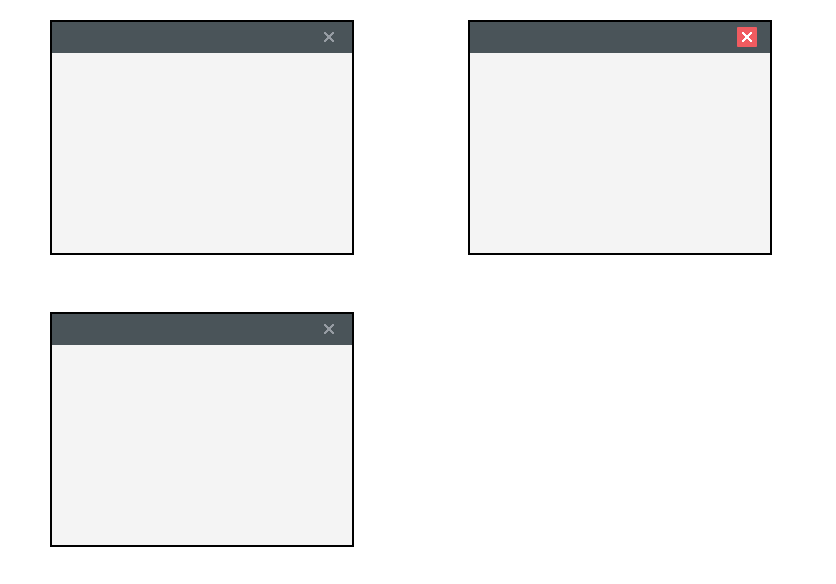
隐藏窗口默认的标题栏,使用创建label对象,使用css将按钮图片替换到label对象中进行布局,充当按钮。
三、代码实现
Java 代码,代码举例自定义标题栏样式。
/**
* 程序入口
* @author Light
*/
public class JavaFXTest extends Application { @Override
public void start(Stage stage) { stage.initStyle(StageStyle.TRANSPARENT); VBox root = new VBox();
root.setId("root");
// 引入样式
root.getStylesheets().add(JavaFXTest.class.getResource("/resources/style.css").toString()); //顶部
VBox top = new VBox();
top.setId("top");
top.setPrefSize(300,26);
// 标题栏
AnchorPane title = new AnchorPane();
Label close = new Label();
close.setPrefWidth(33);
close.setPrefHeight(26);
close.setId("winClose");//winClose css样式Id
title.getChildren().add(close);
AnchorPane.setRightAnchor(close, 0.0);
AnchorPane.setTopAnchor(close, 5.0);
top.getChildren().add(title); // 内容
VBox content = new VBox();
content.setPrefWidth(300);
content.setMinHeight(200);
// 组装
root.getChildren().addAll(top, content);
Scene scene = new Scene(root);
stage.setScene(scene); // 显示
stage.show();
} /**
* @param args the command line arguments
*/
public static void main(String[] args) {
launch(args);
}}
css 代码:
#root {
-fx-border-width:;-fx-border-color:#000;
}#top {
-fx-background-color: #4A5459;
}#winClose {
-fx-cursor:hand;
}#winClose{
-fx-background-image:url("/resources/winClose_0.png");
-fx-background-repeat:no-repeat;
}#winClose:hover {
-fx-background-image:url("/resources/winClose_1.png");
}#winClose:pressed {
-fx-background-image:url("/resources/winClose_2.png");
}
效果演示图: