

正文
iOS悬浮窗口(无论界面跳转、View始终在视图上显示,可移动)

 提示:扫一扫查出行
【扫一扫了解最新限行尾号】
复制提示
2016.09.24 23:52* 字数 71 阅读 5925评论 9喜欢 11
让所有界面都显示,最好还是封装一个继承Window的类:JYCWindow。
先看看效果:
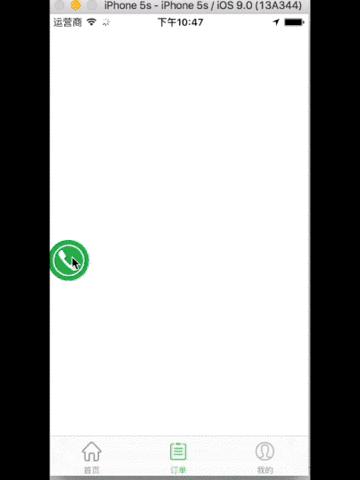
mygif.gif
关键代码如下:
- (instancetype)initWithFrame:(CGRect)frame mainImageName:(NSString*)name bgcolor:(UIColor *)bgcolor animationColor:animationColor{
    if(self = [super initWithFrame:frame])
    {
    NSAssert(name != nil, @"mainImageName can't be nil !");    self.backgroundColor = [UIColor clearColor];
    self.windowLevel = UIWindowLevelAlert + 1;  //如果想在 alert 之上,则改成 + 2
    self.rootViewController = [UIViewController new];
    [self makeKeyAndVisible];    _bgcolor = bgcolor;
    _frameWidth = frame.size.width;
    _animationColor = animationColor;    _mainImageButton =  [UIButton buttonWithType:UIButtonTypeCustom];
    [_mainImageButton setFrame:(CGRect){0, 0,frame.size.width, frame.size.height}];
    [_mainImageButton setImage:[UIImage imageNamed:name] forState:UIControlStateNormal];
    //    _mainImageButton.layer.cornerRadius = frame.size.width*0.5;
    //    _mainImageButton.layer.masksToBounds= YES;
    _mainImageButton.alpha = normalAlpha;
    [_mainImageButton addTarget:self action:@selector(click:) forControlEvents:UIControlEventTouchUpInside];
    if (_animationColor) {
    [_mainImageButton addTarget:self action:@selector(mainBtnTouchDown) forControlEvents:UIControlEventTouchDown];
    }    [self addSubview:_mainImageButton];     // 增加拖动window的手势
    _pan = [[UIPanGestureRecognizer alloc]initWithTarget:self action:@selector(locationChange:)];
    _pan.delaysTouchesBegan = NO;
    [self addGestureRecognizer:_pan];
    _tap = [[UITapGestureRecognizer alloc]initWithTarget:self action:@selector(click:)];
    [self addGestureRecognizer:_tap];    [self performSelector:@selector(justbegin) withObject:nil afterDelay:statusChangeDuration];    }
    return self;
}
至于怎么移动,怎么动画,直接看.h和.m文件如下:
JYCWindow.h###
#import <UIKit/UIKit.h>typedef void(^CallTheService)(void);@interface JYCWindow : UIWindow//重要:所有图片都要是圆形的,程序里并没有自动处理成圆形//  warning: frame的长宽必须相等
- (instancetype)initWithFrame:(CGRect)frame mainImageName:(NSString*)name bgcolor:(UIColor *)bgcolor;// 长按雷达辐射效果
- (instancetype)initWithFrame:(CGRect)frame mainImageName:(NSString*)name bgcolor:(UIColor *)bgcolor animationColor:animationColor;// 显示(默认)
- (void)showWindow;// 隐藏
- (void)dissmissWindow;@property (nonatomic,copy)CallTheService callService;
@end
JYCWindow.m###
#import "JYCWindow.h"
#define kk_WIDTH self.frame.size.width
#define kk_HEIGHT self.frame.size.height#define kScreenWidth [[UIScreen mainScreen] bounds].size.width
#define kScreenHeight [[UIScreen mainScreen] bounds].size.height#define animateDuration 0.3   //位置改变动画时间
#define showDuration 0.1  //展开动画时间
#define statusChangeDuration  3.0    //状态改变时间
#define normalAlpha  1.0   //正常状态时背景alpha值
#define sleepAlpha  0.5   //隐藏到边缘时的背景alpha值
#define myBorderWidth 1.0     //外框宽度
#define marginWith  5     //间隔#define WZFlashInnerCircleInitialRaius  20@interface JYCWindow ()@property(nonatomic)NSInteger frameWidth;
@property(nonatomic,strong)UIPanGestureRecognizer *pan;
@property(nonatomic,strong)UITapGestureRecognizer *tap;
@property(nonatomic,strong)UIButton *mainImageButton;
@property(nonatomic,strong)UIColor *bgcolor;
@property(nonatomic,strong)CAAnimationGroup *animationGroup;
@property(nonatomic,strong)CAShapeLayer *circleShape;
@property(nonatomic,strong)UIColor *animationColor;@end
@implementation JYCWindow
- (instancetype)initWithFrame:(CGRect)frame
{
    self = [super initWithFrame:frame];
    if (self) {
    // Initialization code
    }
    return self;
}- (instancetype)initWithFrame:(CGRect)frame mainImageName:(NSString*)name bgcolor:(UIColor *)bgcolor{
    return [self initWithFrame:frame mainImageName:name bgcolor:bgcolor animationColor:nil];
}- (instancetype)initWithFrame:(CGRect)frame mainImageName:(NSString*)name bgcolor:(UIColor *)bgcolor animationColor:animationColor{
    if(self = [super initWithFrame:frame])
    {
    NSAssert(name != nil, @"mainImageName can't be nil !");    self.backgroundColor = [UIColor clearColor];
    self.windowLevel = UIWindowLevelAlert + 1;  //如果想在 alert 之上,则改成 + 2
    self.rootViewController = [UIViewController new];
    [self makeKeyAndVisible];    _bgcolor = bgcolor;
    _frameWidth = frame.size.width;
    _animationColor = animationColor;    _mainImageButton =  [UIButton buttonWithType:UIButtonTypeCustom];
    [_mainImageButton setFrame:(CGRect){0, 0,frame.size.width, frame.size.height}];
    [_mainImageButton setImage:[UIImage imageNamed:name] forState:UIControlStateNormal];
    //    _mainImageButton.layer.cornerRadius = frame.size.width*0.5;
    //    _mainImageButton.layer.masksToBounds= YES;
    _mainImageButton.alpha = normalAlpha;
    [_mainImageButton addTarget:self action:@selector(click:) forControlEvents:UIControlEventTouchUpInside];
    if (_animationColor) {
    [_mainImageButton addTarget:self action:@selector(mainBtnTouchDown) forControlEvents:UIControlEventTouchDown];
    }    [self addSubview:_mainImageButton];//    [self doBorderWidth:myBorderWidth color:nil cornerRadius:_frameWidth/2];    _pan = [[UIPanGestureRecognizer alloc]initWithTarget:self action:@selector(locationChange:)];
    _pan.delaysTouchesBegan = NO;
    [self addGestureRecognizer:_pan];
    _tap = [[UITapGestureRecognizer alloc]initWithTarget:self action:@selector(click:)];
    [self addGestureRecognizer:_tap];    [self performSelector:@selector(justbegin) withObject:nil afterDelay:statusChangeDuration];    }
    return self;
}- (void)dissmissWindow{
    self.hidden = YES;
}
- (void)showWindow{
    self.hidden = NO;
}- (void)justbegin{    [self performSelector:@selector(changeStatus) withObject:nil afterDelay:statusChangeDuration];    CGPoint panPoint = CGPointMake(kScreenWidth-80, kScreenHeight-150);    [self changBoundsabovePanPoint:panPoint];
}- (void)changBoundsabovePanPoint:(CGPoint)panPoint{    if(panPoint.x <= kScreenWidth/2)
    {
    if(panPoint.y <= 40+kk_HEIGHT/2 && panPoint.x >= 20+kk_WIDTH/2)
    {
    [UIView animateWithDuration:animateDuration animations:^{
    self.center = CGPointMake(panPoint.x, kk_HEIGHT/2);
    }];
    }
    else if(panPoint.y >= kScreenHeight-kk_HEIGHT/2-40 && panPoint.x >= 20+kk_WIDTH/2)
    {
    [UIView animateWithDuration:animateDuration animations:^{
    self.center = CGPointMake(panPoint.x, kScreenHeight-kk_HEIGHT/2);
    }];
    }
    else if (panPoint.x < kk_WIDTH/2+20 && panPoint.y > kScreenHeight-kk_HEIGHT/2)
    {
    [UIView animateWithDuration:animateDuration animations:^{
    self.center = CGPointMake(kk_WIDTH/2, kScreenHeight-kk_HEIGHT/2);
    }];
    }
    else
    {
    CGFloat pointy = panPoint.y < kk_HEIGHT/2 ? kk_HEIGHT/2 :panPoint.y;
    [UIView animateWithDuration:animateDuration animations:^{
    self.center = CGPointMake(kk_WIDTH/2, pointy);
    }];
    }
    }
    else if(panPoint.x > kScreenWidth/2)
    {
    if(panPoint.y <= 40+kk_HEIGHT/2 && panPoint.x < kScreenWidth-kk_WIDTH/2-20 )
    {
    [UIView animateWithDuration:animateDuration animations:^{
    self.center = CGPointMake(panPoint.x, kk_HEIGHT/2);
    }];
    }
    else if(panPoint.y >= kScreenHeight-40-kk_HEIGHT/2 && panPoint.x < kScreenWidth-kk_WIDTH/2-20)
    {
    [UIView animateWithDuration:animateDuration animations:^{
    self.center = CGPointMake(panPoint.x, kScreenHeight-kk_HEIGHT/2);
    }];
    }
    else if (panPoint.x > kScreenWidth-kk_WIDTH/2-20 && panPoint.y < kk_HEIGHT/2)
    {
    [UIView animateWithDuration:animateDuration animations:^{
    self.center = CGPointMake(kScreenWidth-kk_WIDTH/2, kk_HEIGHT/2);
    }];
    }
    else
    {
    CGFloat pointy = panPoint.y > kScreenHeight-kk_HEIGHT/2 ? kScreenHeight-kk_HEIGHT/2 :panPoint.y;
    [UIView animateWithDuration:animateDuration animations:^{
    self.center = CGPointMake(kScreenWidth-kk_WIDTH/2, pointy);
    }];
    }
    }}
//改变位置
- (void)locationChange:(UIPanGestureRecognizer*)p
{
    CGPoint panPoint = [p locationInView:[[UIApplication sharedApplication] keyWindow]];
    if(p.state == UIGestureRecognizerStateBegan)
    {
    [NSObject cancelPreviousPerformRequestsWithTarget:self selector:@selector(changeStatus) object:nil];
    _mainImageButton.alpha = normalAlpha;
    }
    if(p.state == UIGestureRecognizerStateChanged)
    {
    self.center = CGPointMake(panPoint.x, panPoint.y);
    }
    else if(p.state == UIGestureRecognizerStateEnded)
    {
    [self stopAnimation];
    [self performSelector:@selector(changeStatus) withObject:nil afterDelay:statusChangeDuration];    [self changBoundsabovePanPoint:panPoint];    }
}
//点击事件
- (void)click:(UITapGestureRecognizer*)p
{
    [self stopAnimation];    _mainImageButton.alpha = normalAlpha;    //拉出悬浮窗
    if (self.center.x == 0) {
    self.center = CGPointMake(kk_WIDTH/2, self.center.y);
    }else if (self.center.x == kScreenWidth) {
    self.center = CGPointMake(kScreenWidth - kk_WIDTH/2, self.center.y);
    }else if (self.center.y == 0) {
    self.center = CGPointMake(self.center.x, kk_HEIGHT/2);
    }else if (self.center.y == kScreenHeight) {
    self.center = CGPointMake(self.center.x, kScreenHeight - kk_HEIGHT/2);
    }    if (self.callService) {    self.callService();
    }}- (void)changeStatus
{
    [UIView animateWithDuration:1.0 animations:^{
    _mainImageButton.alpha = sleepAlpha;
    }];
    [UIView animateWithDuration:0.5 animations:^{
    CGFloat x = self.center.x < 20+kk_WIDTH/2 ? 0 :  self.center.x > kScreenWidth - 20 -kk_WIDTH/2 ? kScreenWidth : self.center.x;
    CGFloat y = self.center.y < 40 + kk_HEIGHT/2 ? 0 : self.center.y > kScreenHeight - 40 - kk_HEIGHT/2 ? kScreenHeight : self.center.y;    //禁止停留在4个角
    if((x == 0 && y ==0) || (x == kScreenWidth && y == 0) || (x == 0 && y == kScreenHeight) || (x == kScreenWidth && y == kScreenHeight)){
    y = self.center.y;
    }
    self.center = CGPointMake(x, y);
    }];
}//- (void)doBorderWidth:(CGFloat)width color:(UIColor *)color cornerRadius:(CGFloat)cornerRadius{
//    //  self.layer.masksToBounds = YES;
//    self.layer.cornerRadius = cornerRadius;
//    self.layer.borderWidth = width;
//    if (!color) {
//    self.layer.borderColor = [UIColor whiteColor].CGColor;
//    }else{
//    self.layer.borderColor = color.CGColor;
//    }
//}#pragma mark  ------- animation -------------- (void)buttonAnimation{    self.layer.masksToBounds = NO;    CGFloat scale = 1.0f;
//
    CGFloat width = self.mainImageButton.bounds.size.width, height = self.mainImageButton.bounds.size.height;
//
    CGFloat biggerEdge = width > height ? width : height, smallerEdge = width > height ? height : width;
    CGFloat radius = smallerEdge / 2 > WZFlashInnerCircleInitialRaius ? WZFlashInnerCircleInitialRaius : smallerEdge / 2;    scale = biggerEdge / radius + 0.5;
    _circleShape = [self createCircleShapeWithPosition:CGPointMake(width/2, height/2)
          pathRect:CGRectMake(0, 0, radius * 3, radius * 3)
            radius:radius];    // 方形放大效果
//    scale = 2.5f;
//    _circleShape = [self createCircleShapeWithPosition:CGPointMake(width/2, height/2)
//             pathRect:CGRectMake(-CGRectGetMidX(self.mainImageButton.bounds), -CGRectGetMidY(self.mainImageButton.bounds), width, height)
//           radius:self.mainImageButton.layer.cornerRadius];    [self.mainImageButton.layer addSublayer:_circleShape];    CAAnimationGroup *groupAnimation = [self createFlashAnimationWithScale:scale duration:1.0f];    [_circleShape addAnimation:groupAnimation forKey:nil];
}- (void)stopAnimation{    [NSObject cancelPreviousPerformRequestsWithTarget:self selector:@selector(buttonAnimation) object:nil];    if (_circleShape) {
    [_circleShape removeFromSuperlayer];
    }
}- (CAShapeLayer *)createCircleShapeWithPosition:(CGPoint)position pathRect:(CGRect)rect radius:(CGFloat)radius
{
    CAShapeLayer *circleShape = [CAShapeLayer layer];
    circleShape.path = [self createCirclePathWithRadius:rect radius:radius];
    circleShape.position = position;    // 雷达覆盖区域
    circleShape.bounds = CGRectMake(0, 0, radius * 3, radius * 3);
    circleShape.fillColor = _animationColor.CGColor;    //  圆圈放大效果
    //  circleShape.fillColor = [UIColor clearColor].CGColor;
    //  circleShape.strokeColor = [UIColor purpleColor].CGColor;    circleShape.opacity = 0;
    circleShape.lineWidth = 1;    return circleShape;
}- (CAAnimationGroup *)createFlashAnimationWithScale:(CGFloat)scale duration:(CGFloat)duration
{
    CABasicAnimation *scaleAnimation = [CABasicAnimation animationWithKeyPath:@"transform.scale"];
    scaleAnimation.fromValue = [NSValue valueWithCATransform3D:CATransform3DIdentity];
    scaleAnimation.toValue = [NSValue valueWithCATransform3D:CATransform3DMakeScale(scale, scale, 1)];    CABasicAnimation *alphaAnimation = [CABasicAnimation animationWithKeyPath:@"opacity"];
    alphaAnimation.fromValue = @1;
    alphaAnimation.toValue = @0;    _animationGroup = [CAAnimationGroup animation];
    _animationGroup.animations = @[scaleAnimation, alphaAnimation];
    _animationGroup.duration = duration;
    _animationGroup.repeatCount = INFINITY;
    _animationGroup.timingFunction = [CAMediaTimingFunction functionWithName:kCAMediaTimingFunctionEaseOut];    return _animationGroup;
}- (CGPathRef)createCirclePathWithRadius:(CGRect)frame radius:(CGFloat)radius
{
    return [UIBezierPath bezierPathWithRoundedRect:frame cornerRadius:radius].CGPath;
}- (void)mainBtnTouchDown{    [self performSelector:@selector(buttonAnimation) withObject:nil afterDelay:0.5];
}/*
// Only override drawRect: if you perform custom drawing.
// An empty implementation adversely affects performance during animation.
- (void)drawRect:(CGRect)rect {
    // Drawing code
}
*/@end
最后附上小demo


