

正文
AJ学IOS 之tableView的下拉放大图片的方法

 提示:扫一扫查出行
【扫一扫了解最新限行尾号】
复制提示
AJ分享,必须精品
一:效果
tableview下拉的时候上部分图片放大会 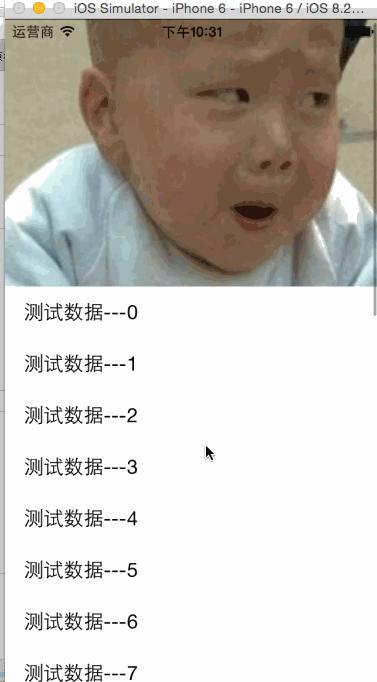
二:代码
直接上代码,自己研究吧
#import "NYViewController.h"//图片的高度
const CGFloat NYTopViewH = 350;@interface NYViewController ()
@property (nonatomic, weak) UIImageView *topView;
@end@implementation NYViewController- (void)viewDidLoad
{
    [super viewDidLoad];    // 设置内边距(让cell往下移动一段距离)
    self.tableView.contentInset = UIEdgeInsetsMake(NYTopViewH * 0.5, 0, 0, 0);    UIImageView *topView = [[UIImageView alloc] init];
    topView.image = [UIImage imageNamed:@"biaoqingdi"];
    topView.frame = CGRectMake(0, -NYTopViewH, 320, NYTopViewH);    //设置图片内容模式,让按照原来宽高比缩放
    topView.contentMode = UIViewContentModeScaleAspectFill;
    [self.tableView insertSubview:topView atIndex:0];
    self.topView = topView;
}#pragma mark - 数据源方法
- (NSInteger)tableView:(UITableView *)tableView numberOfRowsInSection:(NSInteger)section
{
    return 20;
}- (UITableViewCell *)tableView:(UITableView *)tableView cellForRowAtIndexPath:(NSIndexPath *)indexPath
{
    static NSString *ID = @"cell";
    UITableViewCell *cell = [tableView dequeueReusableCellWithIdentifier:ID];
    if (!cell) {
    cell = [[UITableViewCell alloc] initWithStyle:UITableViewCellStyleSubtitle reuseIdentifier:ID];
    }    cell.textLabel.text = [NSString stringWithFormat:@"测试数据---%d", indexPath.row];    return cell;
}- (void)scrollViewDidScroll:(UIScrollView *)scrollView
{
    // 向下拽了多少距离
    CGFloat down = -(NYTopViewH * 0.5) - scrollView.contentOffset.y;
    if (down < 0) return;    CGRect frame = self.topView.frame;    // 5决定图片变大的速度,值越大,速度越快
    frame.size.height = NYTopViewH + down * 5;
    self.topView.frame = frame;
}@end


