

正文
CSS scroll-behavior属性: 滚动框指定滚动行为

 提示:扫一扫查出行
【扫一扫了解最新限行尾号】
复制提示
概念
当用户手动导航或者 CSSOM scrolling API 触发滚动操作时,CSS 属性 scroll-behavior 为一个滚动框指定滚动行为,其他任何的滚动,例如那些由于用户行为而产生的滚动,不受这个属性的影响。在根元素中指定这个属性时,它反而适用于视窗。
语法/* Keyword values */
scroll-behavior: auto; // 滚动条立即滚动
scroll-behavior: smooth; // 窗口平稳滚动/* Global values */
scroll-behavior: inherit;
scroll-behavior: initial;
scroll-behavior: unset;
兼容性
/* Keyword values */
scroll-behavior: auto; // 滚动条立即滚动
scroll-behavior: smooth; // 窗口平稳滚动/* Global values */
scroll-behavior: inherit;
scroll-behavior: initial;
scroll-behavior: unset;
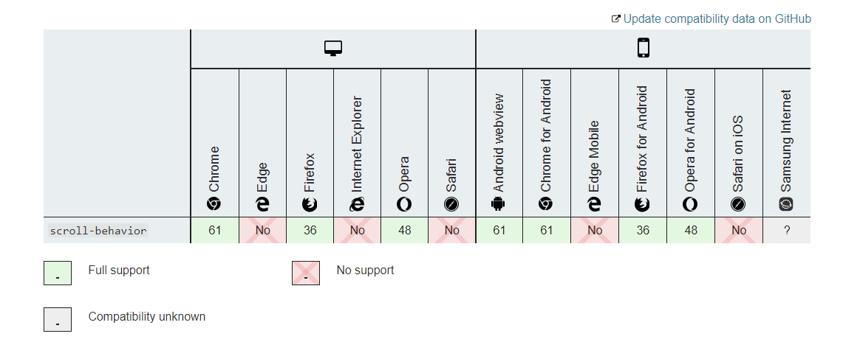
例子<!DOCTYPE html>
<html lang="en">
<head>
<meta charset="UTF-8">
<title>锚点平滑跳转</title> <style>
*{
margin: 0;
padding: 0;
}
html{
scroll-behavior: smooth;
}
nav{
width: 50%;
height: 50px;
text-align: center;
position: fixed;
left: 50%;
transform: translateX(-50%);
top: 0;
background: green;
}
nav a{
display: inline-block;
line-height: 50px;
color: #FFF;
text-decoration: none;
padding: 0 30px;
} .box{
width: 100%;
text-align: center;
font-size: 30px;
color: #FFF;
}
#box1{
background: #d00;
}
#box2{
background: #42a4ff;
}
#box3{
background: #008080;
}
</style>
</head>
<body>
<nav>
<a href="#box1">box1</a>
<a href="#box2">box2</a>
<a href="#box3">box3</a>
</nav> <div id="box1" class=" box">box1</div>
<div id="box2" class=" box">box2</div>
<div id="box3" class=" box">box3</div> <script>
onload = function(){
const _Height = document.documentElement.clientHeight;
const Box = document.getElementsByClassName('box'); for (var i=0;i<Box.length;i++){
Box[i].style.height = _Height + 'px'
Box[i].style.lineHeight = _Height + 'px'
} }
</script>
</body>
</html>
详见 https://developer.mozilla.org/zh-CN/docs/Web/CSS/scroll-behavior
<!DOCTYPE html>
<html lang="en">
<head>
<meta charset="UTF-8">
<title>锚点平滑跳转</title> <style>
*{
margin: 0;
padding: 0;
}
html{
scroll-behavior: smooth;
}
nav{
width: 50%;
height: 50px;
text-align: center;
position: fixed;
left: 50%;
transform: translateX(-50%);
top: 0;
background: green;
}
nav a{
display: inline-block;
line-height: 50px;
color: #FFF;
text-decoration: none;
padding: 0 30px;
} .box{
width: 100%;
text-align: center;
font-size: 30px;
color: #FFF;
}
#box1{
background: #d00;
}
#box2{
background: #42a4ff;
}
#box3{
background: #008080;
}
</style>
</head>
<body>
<nav>
<a href="#box1">box1</a>
<a href="#box2">box2</a>
<a href="#box3">box3</a>
</nav> <div id="box1" class=" box">box1</div>
<div id="box2" class=" box">box2</div>
<div id="box3" class=" box">box3</div> <script>
onload = function(){
const _Height = document.documentElement.clientHeight;
const Box = document.getElementsByClassName('box'); for (var i=0;i<Box.length;i++){
Box[i].style.height = _Height + 'px'
Box[i].style.lineHeight = _Height + 'px'
} }
</script>
</body>
</html>


