

正文
AsyncTask实现登录功能,上传图片,get,post

 提示:扫一扫查出行
【扫一扫了解最新限行尾号】
复制提示
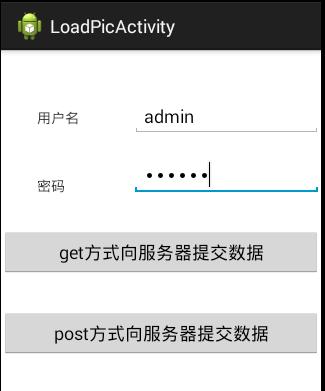
提交成功时,从服务器端返回数据“load success”
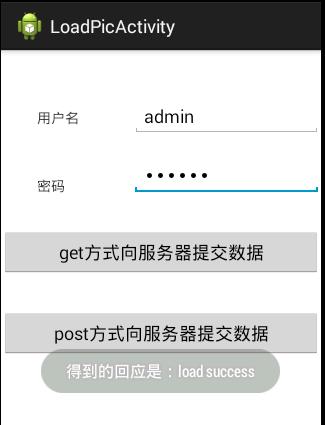
用户名、密码正确后成功登录,并且在服务器端的文件保存目录上看到了从客户端上传的图片。
客户端代码:
MainActivity.java
 import java.io.ByteArrayOutputStream;

 import java.net.URLEncoder;

 import java.util.ArrayList;

 import java.util.List;

 import org.apache.http.HttpResponse;

 import org.apache.http.NameValuePair;

 import org.apache.http.client.HttpClient;

 import org.apache.http.client.entity.UrlEncodedFormEntity;

 import org.apache.http.client.methods.HttpGet;

 import org.apache.http.client.methods.HttpPost;

 import org.apache.http.impl.client.DefaultHttpClient;

 import org.apache.http.message.BasicNameValuePair;

 import org.apache.http.util.EntityUtils;

 import android.app.Activity;

 import android.app.ProgressDialog;

 import android.content.Context;

 import android.graphics.Bitmap;

 import android.graphics.BitmapFactory;

 import android.os.AsyncTask;

 import android.os.Bundle;

 import android.text.TextUtils;

 import android.util.Base64;

 import android.view.View;

 import android.widget.EditText;

 import android.widget.Toast;

 public class Activity2 extends Activity {

     private ProgressDialog dialog;

     private EditText name;

     private EditText pass;

     private Context context;

     private static final String PATH="http://172.16.30.146:8080/Lesson/servlet/LoginServlet?";

     @Override

     protected void onCreate(Bundle savedInstanceState) {

         super.onCreate(savedInstanceState);

         setContentView(R.layout.main2);

         context=this;

         name=(EditText) findViewById(R.id.name);

         pass=(EditText) findViewById(R.id.pass);

         dialog= new ProgressDialog(context);

         dialog.setCancelable(false);

         dialog.setTitle("提示");

         dialog.setMessage("下载中,请稍等.....");

         dialog.setProgressStyle(ProgressDialog.STYLE_SPINNER);

     }

     public void myget(View v)

     {

         String myname=name.getText().toString().trim();

         String mypass=pass.getText().toString().trim();

         if(TextUtils.isEmpty(myname) || TextUtils.isEmpty(mypass))

         {

             Toast.makeText(context, "用户名或密码不能为空", ).show();

             return;

         }

         new MyGetTask().execute(myname,mypass);

     }

     /*采用异步任务

      * 参数一代表 执行异步任务时传递的参数的类型

      * 参数二 如果不采用进度,则填Void,否则填 Integer

      * 参数三 是指网络回传回来的数据类型

      */

     public class MyGetTask extends AsyncTask<String,Void,String>{

         @Override

         protected void onPreExecute() {

             dialog.show();

             super.onPreExecute();

         }

         @Override

         protected String doInBackground(String... params) {

             //1.打开浏览器

             HttpClient client=new DefaultHttpClient();

             //2.输入网址

             String urlPath=null;

             try {

                 urlPath=PATH+"name="+URLEncoder.encode(params[], "utf-8")+"&pass="+URLEncoder.encode(params[], "utf-8");

                 //3.执行并得到回应

                 HttpResponse response=client.execute(new HttpGet(urlPath));

                 if(response.getStatusLine().getStatusCode()==)

                 {

                 String str=    EntityUtils.toString(response.getEntity());

                 return str;

                 }

             } catch (Exception e) {

                 // TODO Auto-generated catch block

                 e.printStackTrace();

             }

             return null;

         }

         @Override

         protected void onPostExecute(String result) {

             dialog.dismiss();

             Toast.makeText(context, "得到的回应是:"+result, ).show();

             super.onPostExecute(result);

         }

     }

     public void mypost(View v)

     {

         String myname=name.getText().toString().trim();

         String mypass=pass.getText().toString().trim();

         if(TextUtils.isEmpty(myname) || TextUtils.isEmpty(mypass))

         {

             Toast.makeText(context, "用户名或密码不能为空", ).show();

             return;

         }

         new MyTaskByPost().execute(myname,mypass);

 /*

         */

     }

     public class MyTaskByPost extends AsyncTask<String, Void, String>{

         //Volley  AsyncHttpClient

         @Override

         protected void onPreExecute() {

             dialog.show();

             super.onPreExecute();

         }

         @Override

         protected String doInBackground(String... params) {

             //1.打开浏览器

             HttpClient client=new DefaultHttpClient();

             //2.输入网址

             String urlPath="http://172.16.30.146:8080/Lesson/servlet/LoginServlet";

             try {

                 //3.设置向服务器提交的数据

                 List<NameValuePair> parameters=new ArrayList();

                 NameValuePair n = new BasicNameValuePair("name",params[]);

                 NameValuePair p = new BasicNameValuePair("pass",params[]);

                 parameters.add(n);

                 parameters.add(p);

                 Bitmap map=BitmapFactory.decodeResource(getResources(), R.drawable.myphoto);

                 ByteArrayOutputStream out=new ByteArrayOutputStream();

                 map.compress(Bitmap.CompressFormat.PNG, , out);

                 byte[] result=out.toByteArray();

             String img=    Base64.encodeToString(result, , result.length, Base64.DEFAULT);

                 NameValuePair m = new BasicNameValuePair("img",img);

                 parameters.add(m);

             UrlEncodedFormEntity    entity = new UrlEncodedFormEntity(parameters, "utf-8");

             HttpPost httpPost = new HttpPost(urlPath);

             httpPost.setEntity(entity);

                 //3.执行并得到回应

                 HttpResponse response=client.execute(httpPost);

                 if(response.getStatusLine().getStatusCode()==)

                 {

                 String str=    EntityUtils.toString(response.getEntity());

                 return str;

                 }

             } catch (Exception e) {

                 // TODO Auto-generated catch block

                 e.printStackTrace();

             }

             return null;

         }

         @Override

         protected void onPostExecute(String result) {

             dialog.dismiss();

             Toast.makeText(context, "得到的回应是:"+result, ).show();

             super.onPostExecute(result);

         }

     }

 }
activity_main.xml
 <?xml version="1.0" encoding="utf-8"?>

 <RelativeLayout xmlns:android="http://schemas.android.com/apk/res/android"

     android:layout_width="match_parent"

     android:layout_height="match_parent" >

     <TextView

         android:id="@+id/textView1"

         android:layout_width="wrap_content"

         android:layout_height="wrap_content"

         android:layout_alignParentLeft="true"

         android:layout_alignParentTop="true"

         android:layout_marginLeft="36dp"

         android:layout_marginTop="58dp"

         android:text="用户名" />

     <EditText

         android:id="@+id/name"

         android:layout_width="wrap_content"

         android:layout_height="wrap_content"

         android:layout_alignBaseline="@+id/textView1"

         android:layout_alignBottom="@+id/textView1"

         android:layout_marginLeft="53dp"

         android:layout_toRightOf="@+id/textView1"

         android:ems="" >

         <requestFocus />

     </EditText>

     <TextView

         android:id="@+id/textView2"

         android:layout_width="wrap_content"

         android:layout_height="wrap_content"

         android:layout_alignLeft="@+id/textView1"

         android:layout_below="@+id/name"

         android:layout_marginTop="49dp"

         android:text="密码" />

     <EditText

         android:id="@+id/pass"

         android:layout_width="wrap_content"

         android:layout_height="wrap_content"

         android:layout_alignBottom="@+id/textView2"

         android:layout_alignLeft="@+id/name"

         android:ems=""

         android:inputType="textPassword" />

     <Button

         android:id="@+id/button1"

         android:layout_width="match_parent"

         android:layout_height="wrap_content"

         android:layout_alignParentRight="true"

         android:layout_below="@+id/textView2"

         android:layout_marginTop="33dp"

         android:onClick="myget"

         android:text="get方式向服务器提交数据" />

     <Button

         android:id="@+id/button2"

         android:layout_width="match_parent"

         android:layout_height="wrap_content"

         android:layout_alignParentLeft="true"

         android:layout_below="@+id/button1"

         android:layout_marginTop="33dp"

         android:onClick="mypost"

         android:text="post方式向服务器提交数据" />

 </RelativeLayout>
清单里注册权限:<uses-permission android:name="android.permission.INTERNET"/>
服务器端代码:
新建Servlet: LoginServlet.java
 package com.my.android;

 import java.io.File;

 import java.io.FileOutputStream;

 import java.io.IOException;

 import java.io.OutputStream;

 import java.io.PrintWriter;

 import javax.servlet.ServletException;

 import javax.servlet.http.HttpServlet;

 import javax.servlet.http.HttpServletRequest;

 import javax.servlet.http.HttpServletResponse;

 import sun.misc.BASE64Decoder;

 /**

  * Servlet implementation class LoginServlet

  */

 public class LoginServlet extends HttpServlet {

     private static final long serialVersionUID = 1L;

     protected void doGet(HttpServletRequest request,

             HttpServletResponse response) throws ServletException, IOException {

         response.setContentType("text/html;charset=utf-8");

         response.setCharacterEncoding("utf-8");

         request.setCharacterEncoding("utf-8");

         String myname = request.getParameter("name");

         String mypass = request.getParameter("pass");

         PrintWriter writer = response.getWriter();

         System.out.println("myname=" + myname + " mypass=" + mypass);

         String img = request.getParameter("img");

         byte[] b = new BASE64Decoder().decodeBuffer(img);

         File file = new File("F:", "myphoto.png");

         if (!file.exists())

             file.createNewFile();

         OutputStream myout = new FileOutputStream(file);

         myout.write(b);

         myout.close();

         writer.write("load success");

         writer.flush();

         writer.close();

     }

     protected void doPost(HttpServletRequest request,

             HttpServletResponse response) throws ServletException, IOException {

         doGet(request, response);

     }

 }


