

正文
cmd wevtutil 读取远程日志错误,Error:在没有配置的 DNS 服务器响应之后,名称 Server23.localdomain 的名称解析超时。

 提示:扫一扫查出行
【扫一扫了解最新限行尾号】
复制提示
想要根据xml文件筛选器读取远程主机最新的几条日志,结果老是提示:
Error : wevtutil qe SystemQuery.xml /f:text /rd:true /c: /sq:true /r:\\******* /u:*********\administrator /p:************

看我之前的文章:Windows提示 错误: RPC 服务器不可用 解决方法。结果设置一样。。。。。
没仔细看原来指定了远程主机时,不能加 \\ ,估计是这个命令不支持吧,systeminfo 远程读取带 \\ 是可以的。正确命令:
wevtutil qe SystemQuery.xml /sq:true /f:text /rd:true /c: /r:********* /u:***********\administrator /p:**********
本以为这样就好了:

其中的SystemQuery.xml
<QueryList>
<Query Id="" Path="System">
<Select Path="System">*[System[(Level= or Level= or Level=)]]</Select>
</Query>
</QueryList>
在开头缺少了xml文件的指定。添加后的SystemQuery.xml
<?xml version="1.0" encoding="UTF-8"?>
<QueryList>
<Query Id="" Path="System">
<Select Path="System">*[System[(Level= or Level= or Level=)]]</Select>
</Query>
</QueryList>
查询开始:
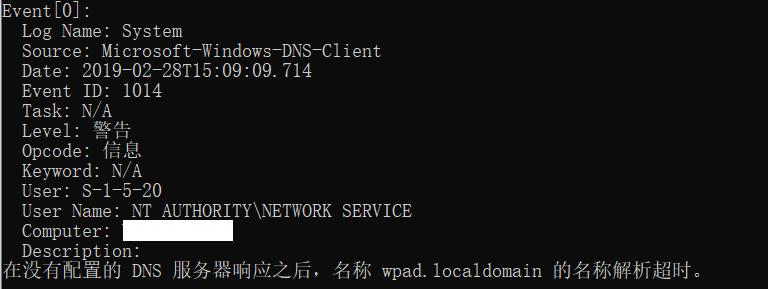
可以看到有这两个错误:
在没有配置的 DNS 服务器响应之后,名称 Server23.localdomain 的名称解析超时。
在没有配置的 DNS 服务器响应之后,名称 wpad.localdomain 的名称解析超时。
百度:
部分转自:https://www.jb51.net/diannaojichu/381132.html
这是由于Windows的一个叫做Network Connectivity Status Indicator (NCSI)的服务导致的:每当用户连接到网络时,Windows 7会向微软的一个域名发送访问请求,再通过访问http://www.msftncsi.com/ncsi.txt获得结果作为网络连接状况指示器,你能够看到“网络受限”的警告就是由这个服务产生的。
访问这个网址:

在这个过程中微软的DNS服务器可以记录来自Windows 7客户机的一些基本信息,接受访问的www.msftncsi.com所在的服务器也可以获得不少客户端的信息,数量庞大的情况下也可以作为侧面一种统计的依据。作为一个“有系统洁癖”的人果断是需要将此服务器关闭的。
一开始在服务中一直都没有找到这个叫做Network Connectivity Status Indicator (NCSI)服务,结果发现这家伙是直接写在注册表的服务项里的(HKEY_LOCAL_MACHINE\SYSTEM\CurrentControlSet\services\NlaSvc),并没有显式表现出来,这让人不得不怀疑这服务是否本意就含有收集客户端信息来进行统计。需要关闭修改注册表键值HKEY_LOCAL_MACHINE\SYSTEM\CurrentControlSet\services\NlaSvc\Parameters\Internet\下的EnableAcetiveProbing值为0。
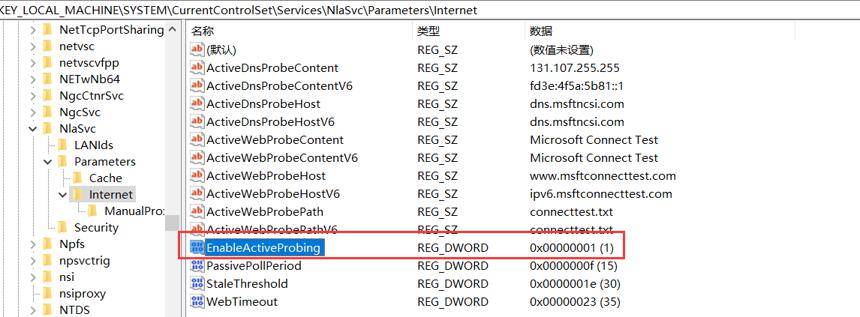
大家可以手动编辑,或者我在这里写了一个对应的脚本,右键管理员运行:
Disable_NCSI_service.bat
@echo off
chcp >nul
cd /D %~dp0
Title NCSI state Change
setlocal enableDelayedExpansion
set NCSI_reg=hklm\SYSTEM\CurrentControlSet\Services\NlaSvc\Parameters\Internetecho NCSI state Change
echo ====================================
echo Author:feiquan
echo Create:// :
echo UpdataDate:// :
echo Version:.0v
echo Function:
echo Change NCSI reg Path %NCSI_reg%
echo Change NCSI reg Value or
echo =====================================echo.
echo Current NCSI service state:
for /F "skip=2 usebackq tokens=3" %%i in (`reg query %NCSI_reg% /v EnableActiveProbing`) do set /a a=%%i & if !a!== ( echo Enable & set data= ) else ( echo Disable & set data=)
echo.
set question=y
set /p question=Do you want to change NCSI state ? (Y/N)
if /i not "%question%"=="Y" exit
echo Start to change NCSI state:
reg add "%NCSI_reg%" /v EnableActiveProbing /t reg_dword /d !data! /f
for /F "skip=2 usebackq tokens=3" %%i in (`reg query %NCSI_reg% /v EnableActiveProbing`) do set /a a=%%i & if !a!== ( echo Enable ) else ( echo Disable )
timeout /t
exit
运行结果:
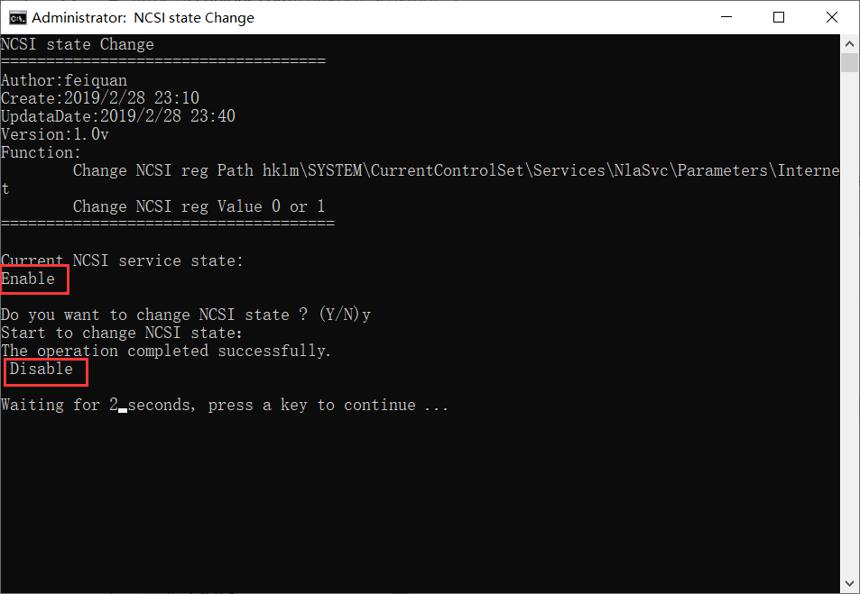
脚本下载:
链接:https://pan.baidu.com/s/1-tmjk56k4x2YPaRdT0RhCg
提取码:ra8r


