正文
PyQt5之 QTableView 添加复选框(自定义委托)

 提示:扫一扫查出行
【扫一扫了解最新限行尾号】
复制提示
import sysfrom untitled import Ui_Form
from PyQt5.QtWidgets import QApplication, QWidget, QStyleOptionButton, QAbstractItemDelegate, QStyle, QCheckBox, QStyledItemDelegate, QStyleOptionViewItem, QItemDelegate
from PyQt5.QtCore import Qt, QAbstractTableModel, QModelIndex, QVariant, QThread, pyqtSignal, QEvent, QRect
from PyQt5.QtGui import QColor, QMouseEventclass WorkThread(QThread):
scrollBottomSignal = pyqtSignal()
addDataSignal = pyqtSignal() def __init__(self, model):
super(WorkThread, self).__init__()
self.model = model
self.run_flag = True def run(self):
while self.run_flag:
self.addDataSignal.emit()
self.scrollBottomSignal.emit()
self.usleep(1) # 不加延迟界面会卡顿。 def stop(self):
self.run_flag = Falseclass MyTableModel(QAbstractTableModel):
def __init__(self):
super(MyTableModel, self).__init__()
self._data = [] # 要显示的数据
self._headers = ['选项', '姓名', '年龄', '性别'] # 表头 def rowCount(self, parent=QModelIndex()):
"""
返回行数量。
"""
return len(self._data) def columnCount(self, parent=QModelIndex()):
"""
返回列数量。
"""
return len(self._headers) def insertRows(self, row, count, parent):
"""
插入行。
:param row: 插入起始行。
:param count: 插入行数量。
:param parent:
:return:
"""
self.beginInsertRows(QModelIndex(), row, row + count - 1)
for i in range(count):
self._data.insert(row, [Qt.Checked, 'CZ', '25', '男'])
self.endInsertRows()
return True def removeRows(self, row, count, parent):
self.beginRemoveRows(QModelIndex(), 0, row + count - 1)
for i in range(count):
self._data.pop(row + count - 1 - i) # 倒着删
self.endRemoveRows() def clearView(self):
self.removeRows(0, self.rowCount(), QModelIndex()) def addData(self):
self.insertRows(self.rowCount(), 1, QModelIndex()) def headerData(self, section, orientation, role):
"""
设置表头。
"""
if role == Qt.DisplayRole and orientation == Qt.Horizontal: # 限定只更改行表头
return self._headers[section] def data(self, index, role=Qt.DisplayRole):
if not index.isValid() or not 0 <= index.row() < self.rowCount():
return QVariant() row = index.row()
col = index.column() if role == Qt.DisplayRole:
if col != 0:
return str(self._data[row][col]) # 数据
elif role == Qt.TextColorRole:
return QColor(Qt.red)
elif Qt.UserRole:
if col == 0:
return self._data[row][col] return QVariant() def setData(self, index, value, role):
if not index.isValid() or not 0 <= index.row() < self.rowCount():
return False
col = index.column()
row = index.row() if role == Qt.UserRole or role == Qt.CheckStateRole:
if col == 0:
self._data[row][col] = value
self.layoutChanged.emit()
return True return False def flags(self, index):
flags = Qt.ItemFlags(Qt.ItemIsEnabled | Qt.ItemIsSelectable)
return flagsclass MyDelegate(QStyledItemDelegate):
def __init__(self):
super(MyDelegate, self).__init__() def paint(self, painter, option, index):
if index.column() == 0:
data = index.model().data(index, Qt.UserRole) ckbtn = QStyleOptionButton()
ckbtn.state = QStyle.State_On if data == Qt.Checked else QStyle.State_Off
ckbtn.state |= QStyle.State_Enabled
ckbtn.rect = option.rect QApplication.style().drawControl(QStyle.CE_CheckBox, ckbtn, painter)
else:
QStyledItemDelegate.paint(self, painter, option, index) def editorEvent(self, event, model, option, index):
if event.type() == QEvent.KeyPress:
return False
if event.type() == QEvent.MouseButtonRelease:
event = QMouseEvent(event) # 类型强转
if event.button() == Qt.LeftButton:
value = index.data(Qt.UserRole) if value == Qt.Checked:
rev_value = Qt.Unchecked
else:
rev_value = Qt.Checked return model.setData(index, rev_value, Qt.UserRole)
else:
return False
else:
return Falseclass MainUI(QWidget, Ui_Form):
def __init__(self):
super(MainUI, self).__init__()
self.setupUi(self)
self.workThread = None self.pushButton.clicked.connect(self.buttonClickedStart)
self.pushButton_2.clicked.connect(self.buttonClickedStop)
self.pushButton_3.clicked.connect(self.buttonClickedClear) self.model = MyTableModel()
self.myDelegate = MyDelegate()
self.tableView.setItemDelegate(self.myDelegate)
self.tableView.setModel(self.model) self.tableView.show() def buttonClickedStart(self):
"""开启线程,向表中插入数据。"""
self.workThread = WorkThread(self.model)
self.workThread.addDataSignal.connect(self.model.addData)
self.workThread.scrollBottomSignal.connect(self.scrollBottom)
self.workThread.start() def buttonClickedStop(self):
"""停止线程向表中插入数据。"""
self.workThread.stop() def buttonClickedClear(self):
"""清空表。"""
self.model.clearView() def scrollBottom(self):
"""右侧滑动条保持在最下面。"""
self.tableView.scrollToBottom()if __name__ == '__main__':
app = QApplication(sys.argv) ui = MainUI()
ui.show()
sys.exit(app.exec_())
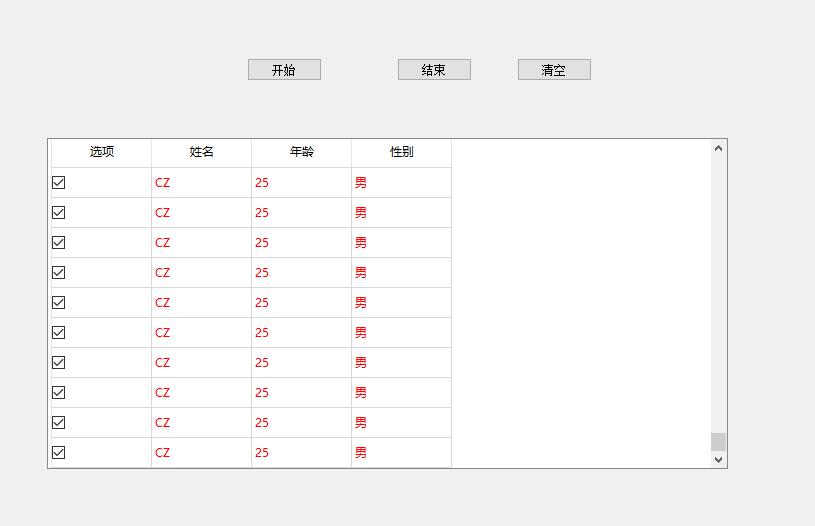
程序运行界面图: