

正文
shell编程基础(三): 位置参数与shell脚本的输入输出

 提示:扫一扫查出行
【扫一扫了解最新限行尾号】
复制提示
一、位置参数和特殊变量
有很多特殊变量是被Shell自动赋值的,我们已经遇到了$?和$1,现在总结一下:
常用的位置参数和特殊变量:
$0 相当于C语言main函数的argv[0]
$1、$2... 这些称为位置参数(Positional Parameter),相当于C语言main函数的argv[1]、argv[2]...
$# 相当于C语言main函数的argc - 1,表示输入参数的个数,注意这里的#后面不表示注释
$@ 表示参数列表"$1" "$2" ...,例如可以用在for循环中的in后面。
$* 表示参数列表"$1" "$2" ...,同上
$? 上一条命令的Exit Status
$$ 当前进程号
位置参数可以用shift命令左移。比如shift 3表示原来的$4现在变成$1,原来的$5现在变成$2等等,原来的$1、$2、$3丢弃,$0不移动。不带参数的shift命令相当于shift 1。例如:
[root@VM_0_5_centos test]# vi tsite.sh
查看脚本内容
[root@VM_0_5_centos test]# cat tsite.sh
#!/bin/sh
echo '$0相当于C语言main函数的argv[0]'
echo "The program $0 is now running"
echo '-------------------------'
echo "The first parameter is --> $1"
echo "The second parameter is --> $2"
echo '-------------------------'
echo "The parameter list is --> $@"
echo '-------------------------'
echo 'shift命令默认左移一位'
shift
echo "The first parameter is --> $1"
echo "The second parameter is --> $2"
echo "The parameter list is --> $@"
echo '-------------------------'
echo "当前进程号 --> $$"
echo "当前输入参数个数 --> $#"
提升脚本权限
[root@VM_0_5_centos test]# chmod a+w tsite.sh
[root@VM_0_5_centos test]# ls
$ $ mmzs tsite.sh
运行测试脚本
[root@VM_0_5_centos test]# sh tsite.sh aa bb cc dd ee
$0相当于C语言main函数的argv[0]
The program tsite.sh is now running
-------------------------
The first parameter is --> aa
The second parameter is --> bb
-------------------------
The parameter list is --> aa bb cc dd ee
-------------------------
shift命令默认左移一位
The first parameter is --> bb
The second parameter is --> cc
The parameter list is --> bb cc dd ee
-------------------------
当前进程号 --> 6871
当前输入参数个数 --> 4
二、shell输入输出1、echo
echo显示文本行或变量,或者把字符串输入到文件。
echo [option] string
-e 解析转义字符
-n 不回车换行。默认情况echo回显的内容后面跟一个回车换行。[root@VM_0_5_centos test]# vi techo.sh
查看脚本内容
[root@VM_0_5_centos test]# cat techo.sh
#!/bin/sh
echo "hello\n\n"
echo -e "hello\n\n"
echo "hello"
echo -n "hello"
运行测试脚本
[root@VM_0_5_centos test]# sh techo.sh
hello\n\n
hellohello
hello[root@VM_0_5_centos test]#
2、管道|
可以通过管道把一个命令的输出传递给另一个命令做输入。管道用竖线表示。
[root@VM_0_5_centos test]# cat techo.sh | more
#!/bin/sh
echo "hello\n\n"
echo -e "hello\n\n"
echo "hello"
echo -n "hello"
[root@VM_0_5_centos test]# ls -l | grep "t"
total 12
-rw-r--r-- 1 root root 0 Jul 12 14:50 $ $
drwxr-xr-x 2 root root 4096 Jul 12 15:26 mmzs
-rw-r--r-- 1 root root 77 Jul 13 11:24 techo.sh
-rw-rw-rw- 1 root root 559 Jul 13 10:54 tsite.sh
df -k | awk '{print $1}' | grep -v "文件系统"
df -k 查看磁盘空间,找到第一列,去除“文件系统”,并输出
[root@VM_0_5_centos test]# df -k Filesystem 1K-blocks Used Available Use% Mounted on /dev/vda1 51474024 8321872 40829692 17% / devtmpfs 932328 0 932328 0% /dev tmpfs 941808 24 941784 1% /dev/shm tmpfs 941808 556 941252 1% /run tmpfs 941808 0 941808 0% /sys/fs/cgroup tmpfs 188364 0 188364 0% /run/user/0
3、tee
tee命令把结果输出到标准输出,另一个副本输出到相应文件。
df -k | awk '{print $1}' | grep -v "文件系统" | tee a.txt
tee -a a.txt表示追加操作。
df -k | awk '{print $1}' | grep -v "文件系统" | tee -a a.txt
//将ls -l命令的结果输出到a.txt文件中
[root@VM_0_5_centos test]# ls -l | tee a.txt
4、文件重定向
概念理解:
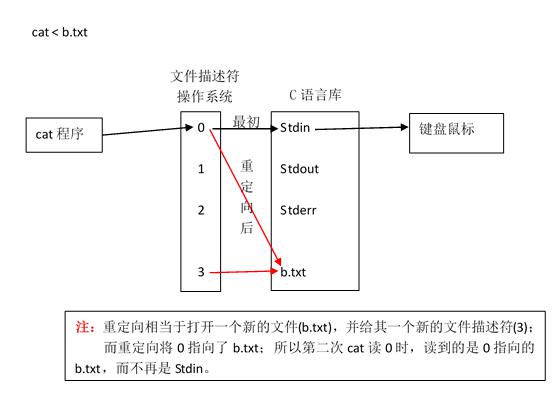
cmd表示输入的命令
cmd > file 把标准输出重定向到新文件中
cmd >> file 追加
cmd > file 2>&1 标准出错2也重定向到标准输出1所指向的标准输出的file里
cmd >> file 2>&1cmd < &fd 把文件描述符fd作为标准输入
cmd > &fd 把文件描述符fd作为标准输出 cmd < &- 关闭标准输入
例如:
cat 1.txt相当于open,直接打开文件读取内容
cat < 1.txt此时cat是去读标准输入,但是标准输入指向1.txt文件,所以cat就去读1.txt文件了cmd < file1 > file2 输入定向到file1,输出定向到file2文件里


