

正文
js 前端有消息了 声音提示给用户

 提示:扫一扫查出行
【扫一扫了解最新限行尾号】
复制提示
前言:工作中有需求,在数据变更有变更时采用声音提示给用户,这里记录一下。转载请注明出处:https://www.cnblogs.com/yuxiaole/p/9936180.html
网站地址: 我的个人vue+element ui demo网站
github地址: yuleGH github
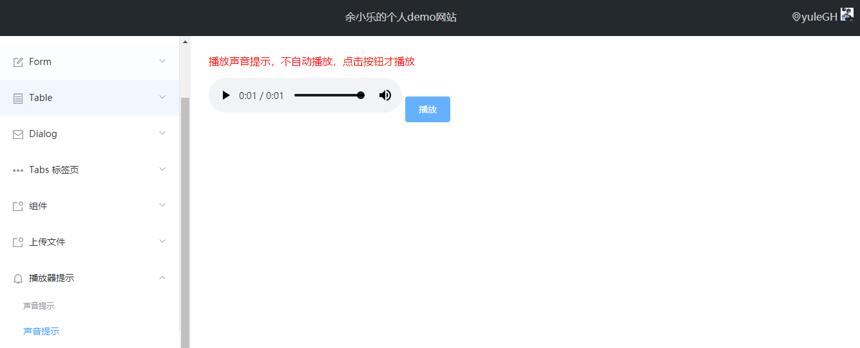
代码如下(采用 html5 的 audio):
<html>

<head>

    <title>测试</title>

    <!-- 引入样式 -->

    <link rel="stylesheet" href="../lib/elementui/theme-chalk/index.css" type="text/css">

</head>

<body>

<div id="app">

    <p style="color: red;">播放声音提示,不自动播放,点击按钮才播放</p>

    <audio ref="msgTipAudio" controls="controls">

        <source src="tip.mp3" type="audio/mpeg"/>

        Your browser does not support the audio element.

    </audio>

    <el-button type="primary" @click="playAudio">播放</el-button>

</div>

<!-- 引入组件库 -->

<script type="text/javascript" src="../lib/vue.js"></script>

<script type="text/javascript" src="../lib/elementui/index.js"></script>

<script type="text/javascript">

    new Vue({

        el: "#app",

        data: {

        },

        methods: {

            playAudio(){

                this.$refs.msgTipAudio.play().catch(this.catchException);

            },

            catchException: function(exceptionMsg){

                var _self = this;

                console.error(exceptionMsg);

                _self.$message({

                    type: 'error',

                    message: '该浏览器不支持播放声音!解决方案:1、点击该弹出框。或者 1、打开chrome;' +

                    '2、输入 chrome://flags/#autoplay-policy;3、点击default,选择 Setting No user gesture is required;' +

                    '4、重启chrome;',

                    duration: 0

                });

            }

        }

    });

</script>

</body>

</html>
转载请注明出处:https://www.cnblogs.com/yuxiaole/p/9936180.html


